

*.58)' d='M13 49h0m59 0h0m0 59h0m-59 0h0m0 59h0m0 60h0m59 0h0m0-60h0m118 0h0m-59 0h0m0 60h0m59 0h0m59 0h0m0-60h0m0-59h0m-59 0h0m-59 0h0m59-59h0m-59 0h0m118 0h0m59 0h0m0 59h0m59 0h0m0-59h0m59 0h0m59 0h0m0 59h0m-59 0h0m0 59h0m59 0h0m0 60h0m-59 0h0m-59 0h0m0-60h0m-59 0h0m0 60h0m0 59h0m0 59h0m59 0h0m0-59h0m59 0h0m59 0h0m0 59h0m-59 0h0m0 59h0m59 0h0m0 59h0m-59 0h0m-59 0h0m0-59h0m-59 0h0m0 59h0m-59 0h0m-118 0h0m59 0h0m-59-59h0m59 0h0m59 0h0m0-59h0m0-59h0m-59 0h0m-59 0h0m0 59h0m59 0h0m-118 0h0m0-59h0m-59 0h0m0 59h0m0 59h0m59 0h0m0 59h0m-59 0h0m0 59h0m0 59h0m59 0h0m0-59h0m59 0h0m59 0h0m59 0h0m0 59h0m-59 0h0m-59 0h0m0 59h0m0 59h0m59 0h0m0-59h0m59 0h0m0 59h0m0 59h0m-59 0h0m-59 0h0m-59 0h0m0-118h0m0 59h0m-59-59h0m0 59h0m0 59h0m0 59h0m59 0h0m0 59h0m-59 0h0m0 59h0m0 59h0m59 0h0m0-59h0m118 0h0m-59 0h0m0 59h0m59 0h0m59 0h0m0-59h0m0-59h0m-59 0h0m-59 0h0m59-59h0m-59 0h0m118 0h0m59 0h0m59 0h0m0 59h0m-59 0h0m0 59h0m0 59h0m59 0h0m0-59h0m59 0h0m0 59h0m59 0h0m0-59h0m0-59h0m-59 0h0m0-59h0m59 0h0m0-59h0m0-59h0m0-59h0m-59 59h0m0-59h0m0 118h0m-59 0h0m-59 0h0m0-59h0m0-59h0m59 59h0m0-59h0m0-59h0m-59 0h0m0-59h0m59 0h0m59 0h0m0 59h0m59 0h0m0-59h0m59 0h0m0 59h0m59 0h0m0-59h0m59 0h0m59 0h0m0 59h0m-59 0h0m0 59h0m0 59h0m59-59h0m0 59h0m0 59h0m-59 0h0m-59 0h0m0-118h0m0 59h0m-59 0h0m0-59h0m0 118h0m0 59h0m59 0h0m0 59h0m-59 0h0m0 59h0m0 59h0m59 0h0m0-59h0m59 0h0m0 59h0m59 0h0m0-59h0m0-59h0m-59 0h0m0-59h0m59 0h0m60 0h0m59 0h0m0 59h0m-59 0h0m0 59h0m0 59h0m59 0h0m0-59h0m118 0h0m-59 0h0m0 59h0m59 0h0m59 0h0m0-59h0m0-59h0m-59 0h0m-59 0h0m59-59h0m-59 0h0m118 0h0m0-59h0m0-59h0m0-59h0m-59 59h0m0-59h0m-59 0h0m0 59h0m59 59h0m-59 0h0m-59 0h0m-59 0h0m0-59h0m0-59h0m59 0h0m0 59h0m0-118h0m-59 0h0m0-59h0m59 0h0m59 0h0m59 0h0m-59 59h0m59 0h0m59 0h0m0-59h0m0-59h0m-118 0h0m59 0h0m-59-59h0m59 0h0m59 0h0m0-59h0m0-59h0m-59 0h0m-59 0h0m0 59h0m59 0h0m-118 0h0m0-59h0m-59 0h0m0 59h0m0 59h0m59 0h0m0 59h0m-59 0h0m-60 0h0m0-59h0m-59 0h0m0 59h0m-59 0h0m-59 0h0m0-59h0m59 0h0m0-59h0m-59 0h0m0-59h0m59 0h0m59 0h0m0 59h0m59 0h0m0-59h0m0-59h0m0-60h0m-59 0h0m0 60h0m-59 0h0m-59 0h0m0-60h0m59 0h0m0-59h0m-59 0h0m0-59h0m59 0h0m59 0h0m0 59h0m59 0h0m0-59h0m60 0h0m59 0h0m0 59h0m-59 0h0m0 59h0m0 60h0m59 0h0m0-60h0m118 0h0m-59 0h0m0 60h0m59 0h0m59 0h0m0-60h0m0-59h0m-59 0h0m-59 0h0m59-59h0m-59 0h0m118 0h0m59 0h0m0 59h0m59 0h0m0-59h0m59 0h0m59 0h0m0 59h0m-59 0h0m0 59h0m59 0h0m0 60h0m-59 0h0m-59 0h0m0-60h0m-59 0h0m0 60h0m0 59h0m59 0h0m0 59h0m-59 0h0m0 59h0m0 59h0m59 0h0m0-59h0m59 0h0m0 59h0m59 0h0m0-59h0m0-59h0m-59 0h0m0-59h0m59 0h0m59 0h0m0 59h0m0 59h0m0 59h0m0-236h0m0-60h0m0-59h0m0-59h0m0 945h0m0-59h0m0-59h0m0-59h0m0-295h0m0 59h0m0 118h0m0-59h0m0 118h0m-59 0h0m-59 0h0m0-59h0m0-59h0m59 59h0m0-59h0m0-59h0m0-59h0m-59 0h0m0 59h0m-59 0h0m0-59h0m-59 0h0m0 59h0m0 118h0m0-59h0m59 0h0m0 59h0m0 59h0m-59 0h0m0 59h0m0 59h0m59 0h0m0-59h0m59 0h0m59 0h0m0 59h0m-59 0h0m0 59h0m59 0h0m0 59h0m-59 0h0m-59 0h0m0-59h0m-59 0h0m0 59h0'/%3E%3Cpath data-poster-part='shape' stroke-width='3' stroke-opacity='.16' d='M508 71h0m2 8h0m-11 0h0m3 8h0m-11 8h0m0-9h0m-9 9h0m5 5h0m-7 6h0m8-7h0m-22 17h0m6-5h0m6-7h0m-7 1h0m-8 5h0m-10 5h0m8-2h0m-2 13h0m-5 1h0m-8 64h0m3-59h0m6 4h0m-4 13h0m1 9h0m0 7h0m-1 3h0m-3 15h0m2-3h0m1 6h0m-1 7h0m3 11h0m-5 22h0m-5 28h0m4-11h0m-5-6h0m3-19h0m-2-7h0m2-9h0m1-4h0m0 111h0m-2-5h0m3-12h0m-4-8h0m1-12h0m1-2h0m0-8h0m6 30h0m2 9h0m-1 4h0m-3 14h0m-1 4h0m6 0h0m2 5h0m-3 17h0m3-7h0m0 15h0m-7 23h0m-4 4h0m-4-6h0m-2 1h0m-2 6h0m-44 54h0m13-7h0m25-7h0m4 19h0m-1 4h0m1-15h0m-2-9h0m7-12h0m-7 3h0m5-20h0m-1 2h0m56 22h0m-8 5h0m4 1h0m10-4h0m9 4h0m-3 5h0m-44-8h0m-2 3h0m-6-5h0m25 82h0m-25-9h0m1 8h0m6 8h0m-8 1h0m-4-1h0m-1-1h0m-23-14h0m10-3h0m12 7h0m-3-7h0m0-14h0m-4 3h0m-1-11h0m7-1h0m-4-5h0m-2-9h0m-3 7h0m-43 37h0m-11-6h0m-29 4h0m-23 8h0m4-6h0m-11 1h0m11-10h0m4 4h0m5 2h0m-1-22h0m5-8h0m30-19h0m-11 5h0m-50 49h0m-87 3h0m-19 4h0m-115 80h0m-9 7h0m9 8h0m-1 9h0m13 25h0m0 4h0m1-10h0m5-77h0m-9 6h0m0-8h0m-12 17h0m17-21h0m26-10h0m37-13h0m12-7h0m-45 148h0m22 23h0m12 7h0m14 10h0m3-3h0m23 4h0m-6 3h0m-1 0h0m8 4h0m15 7h0m-1 1h0m27 29h0m-7 15h0m7 1h0m-12 104h0m8-5h0m-9 1h0m-2-8h0m0-6h0m6 0h0m-8-15h0m4-46h0m2 10h0m-8 0h0m6-17h0m9-4h0m0-6h0m14 101h0m12 10h0m6 9h0m-5 0h0m-2 0h0m15 12h0m15 2h0m35 12h0m-7 0h0m-10-12h0m47 9h0m22 0h0m16 10h0m2-7h0m0-3h0m3-5h0m5-5h0m2 4h0m5 2h0m20 1h0m-9-1h0m-5 9h0m7-6h0m4 2h0m-16 12h0m-11-7h0m1 5h0m62 2h0m-4-10h0m-9-1h0m0 6h0m-8-16h0m-5 0h0m11 1h0m12 4h0m2 0h0m11-2h0m-8 4h0m0 1h0m9 2h0m13 4h0m8-8h0m-9-3h0m-4-6h0m-2 0h0m-9-70h0m-18 16h0m6-16h0m-4 4h0m-7 3h0m0 5h0m-10-6h0m-1 4h0m-3 8h0m-23 15h0m-1-1h0m-2 0h0m-4 13h0m4 4h0m-8 12h0m-1-2h0m-2-5h0m1-11h0m0-6h0m-2-8h0m10-8h0m4 3h0m-2 7h0m9-10h0m7 9h0m6-8h0m1-12h0m-12 5h0m-21-64h0m55-10h0m8 7h0m-25 23h0m16 28h0m9-3h0m6-28h0m6 14h0m-4 7h0m1 5h0m5-1h0m-2-2h0m10-6h0m-3-2h0m0-2h0m0-5h0m5 3h0m4-11h0m-1 5h0m1-15h0m-8-5h0m6 7h0m-23 7h0m15-16h0m-8-12h0m-11-4h0m-11-5h0m-13-6h0m9-6h0m-7-5h0m57-94h0m-2-11h0m-3 3h0m-120 42h0m18 10h0m-16-7h0m12 16h0m22 15h0m5 4h0m13 16h0m-72 27h0m-111-8h0m21-31h0m-2 0h0m-2 4h0m21-23h0m-5 5h0m8-19h0m-1 4h0m54-48h0m-21 19h0m43-12h0m-2 2h0m-9-21h0m-39-59h0m4 15h0m-13-56h0m11-9h0m-1 17h0m5 4h0m-3 18h0m80 34h0m28-7h0m-10 8h0m24-21h0m44 32h0m2 9h0m2 4h0m3 1h0m3 8h0m5-6h0m-4-14h0m0-7h0m-10-2h0m-5-1h0m-1-7h0m4-2h0m-10-8h0m6-6h0m-7 0h0m17-28h0m-17 1h0m1 11h0m1 7h0m-3-2h0m-4-7h0m-20 7h0m23-15h0m-3-9h0m0-9h0m2-9h0m-6 4h0m0 7h0m-18-29h0m7 2h0m4 5h0m5 2h0m6 3h0m-1-11h0m91 6h0m-4 2h0m-16 11h0m-26 107h0m184-121h0m-5-1h0m8 2h0m37 0h0m-6 1h0m2 5h0m-1-1h0m-183 176h0m0-5h0m4-7h0m-7-2h0m-4-11h0m10 2h0m-10-10h0m-4-2h0m-13 0h0m1-5h0m5 1h0m-5-11h0m-5 4h0m-14-10h0m3 9h0m11 5h0m0 7h0m14 9h0m16 41h0m-1-9h0m2 29h0m-4-10h0m-3 2h0m0 9h0m-1 7h0m-6-2h0m1 7h0m13-12h0m-17 29h0m-12-1h0m3-5h0m7-2h0m-1-9h0m-15 19h0m-11 15h0m5-1h0m8 0h0m-3-10h0m11 2h0m-4 7h0m-3 5h0m-8 5h0m-6 5h0m3 4h0m-3-3h0m30 19h0m-13-2h0m20 4h0m55 11h0m-9 21h0m18-11h0m4 22h0m-5 24h0m-8 10h0m-10 0h0m11-9h0m-86 13h0m8 4h0m-3 6h0m14 3h0m-10-2h0m5-4h0m2-4h0m6 1h0m4-2h0m6 9h0m7-4h0m10 0h0m-6 9h0m11 3h0m-10 4h0m-6 2h0m-3-7h0m-5-4h0m47 18h0m5-9h0m1-2h0m-7-7h0m4 9h0m-9 0h0m-6-1h0m-8 4h0m8-10h0m7 2h0m-3-14h0m26 17h0m1 5h0m1-8h0m14-3h0m-6 10h0m9 0h0m19-16h0m-6 1h0m1 11h0m-5 5h0m13 1h0m-5-13h0m19-6h0m-7 4h0m-5-12h0m13 3h0m8-5h0m-5 11h0m9-11h0m4 3h0m4 1h0m6 0h0m-40 31h0m71-19h0m-12 1h0m2-5h0m-12-2h0m1-9h0m10 2h0m6 3h0m23-5h0m13 3h0m7 1h0m-1-19h0m-4 2h0m-6 6h0m-9 1h0m-5-2h0m10-7h0m9-29h0m-20-10h0m-17 1h0m-8 6h0m17 39h0m3 3h0m-7-1h0m-4 4h0m-8-1h0m1-4h0m-11 4h0m-4 0h0m-10-3h0m-2-21h0m-11 21h0m-12 4h0m-5-15h0m-3-7h0m-2 4h0m24-29h0m-38-18h0m121-3h0m79-29h0m7-13h0m1 4h0m4 7h0m35-19h0m4 1h0m-29 8h0m-19 16h0m32 50h0m-65 41h0m-5-11h0m-23 5h0m11-5h0m-19 10h0m2-8h0m-2 2h0m5 16h0m-11 6h0m29 4h0m-14-4h0m9-8h0m11-2h0m1 12h0m0 1h0m4-15h0m19 14h0m-9-1h0m2-4h0m-6 5h0m5 2h0m8 7h0m-1 6h0m-5-3h0m-12 1h0m-2-11h0m-1 3h0m-6 0h0m34 9h0m2-5h0m9-3h0m-3-12h0m-9 5h0m3-3h0m-2-5h0m9-4h0m5 5h0m8 8h0m5-10h0m5-3h0m8 1h0m0 7h0m-10 3h0m11 6h0m8 4h0m-3 6h0m10-1h0m-3-4h0m6-8h0m-3-3h0m1-3h0m-6 0h0m-5-5h0m29 5h0m-1 0h0m-12 1h0m1 10h0m8 1h0m14 10h0m2-8h0m4-7h0m-9-3h0m0-9h0m16 10h0m3-9h0m16 9h0m-5 1h0m-4 1h0m15 10h0m-10 4h0m-9 0h0m2-11h0m-10 5h0m9 15h0m8-6h0m68-1h0m-1 1h0m-2 11h0m-8-2h0m-1-9h0m-16-10h0m-7-1h0m-17 1h0m-5-3h0m9 1h0m-1-6h0m-5-6h0m14 4h0m24-2h0m-4 4h0m-5-6h0m10 17h0m10-4h0m-4-1h0m3 10h0m9-3h0m-4-74h0m-37 3h0m-7 12h0m18 3h0m-25 15h0m-4-2h0m-3-10h0m-37-6h0m59-93h0m8 2h0m12 27h0m19-12h0m-8-5h0m-2 4h0m-7-10h0m-1-1h0m-5 6h0m-1-9h0m3-6h0m6 6h0m10 2h0m2 5h0m-22-36h0m-10 19h0m3-3h0m-10-2h0m-1 1h0m-1 4h0m-8-11h0m2-5h0m-2 1h0m-3-29h0m18-13h0m-1 0h0m2 1h0m-1 10h0m27-29h0m-1 12h0m-15-8h0m-24-6h0m-6 2h0m-4-10h0m-7-15h0m-5-1h0m1-4h0m-3-4h0m-9-8h0m-39 48h0m3 6h0m1 3h0m5 8h0m4 12h0m0-4h0m7 0h0m0 12h0m10-1h0m-6-4h0m-9-8h0m40 11h0m-15 5h0m-4-3h0m7 18h0m-4-8h0m1-4h0m7 0h0m4 3h0m5 2h0m0 8h0m-3-7h0m-24 3h0m-8 0h0m-42-72h0m8 14h0m9 12h0m-5-10h0m1-4h0m-4-3h0m-5 1h0m1-24h0m-3 4h0m1-4h0m-1-12h0m0-7h0m2-2h0m0 5h0m0 10h0m-5-20h0m-7 3h0m-2-9h0m6-5h0m1 5h0m-1-7h0m-6-8h0m25-15h0m-9-11h0m-17-11h0m-5 24h0m2-3h0m-3-7h0m1-11h0m1-4h0m-3 7h0m5 26h0m-2 9h0m-63-86h0m-24-7h0m19-1h0m2-5h0m11 9h0m7 13h0m1 0h0m2-2h0m9 0h0m25 4h0m-3 2h0m-9 10h0m-3-1h0m12 6h0m10 5h0m-8-12h0m20-9h0m7 11h0m-11 2h0m0 3h0m1 3h0m0 8h0m3-31h0m-4-7h0m4-5h0m4-4h0m-8-7h0m22-3h0m-7 5h0m9-6h0m59 58h0m-12-1h0m-30-11h0m3 3h0m-12 41h0m9 15h0m31-41h0m11 0h0m15 5h0m14-1h0m11 12h0m29 11h0m-16-6h0m-7-12h0m-96-85h0m1-12h0m0-3h0m5-5h0m0-5h0m0 1h0m-8-8h0m10 0h0m-1-13h0m6-7h0m19-26h0m-16 12h0m-2 8h0m0 2h0m-11-13h0m5 0h0m3-1h0m-4-12h0m8 3h0m2 4h0m-2 0h0m-1-14h0m-1 0h0m-5-12h0m5 1h0m0-14h0m57 39h0m-8 4h0m51 7h0m8-7h0m-114-48h0m-2-6h0m-4 3h0m-5-3h0m-2 2h0m-10-2h0m1-6h0m0-13h0m0 4h0m3-23h0m-2 11h0m0-18h0m3-10h0m1-2h0m0-7h0m0-7h0m-6-3h0m6-2h0m0-9h0m1-2h0m0-6h0m-9 4h0m1-8h0m8-2h0m1-7h0m-1-13h0m-6 1h0m2 8h0m-102 180h0m17-2h0m29-12h0m0 3h0m3 4h0m61 52h0m2 6h0m-2 10h0m-8 3h0m-6-3h0m-116-9h0m-3 4h0m-23-8h0m-26-13h0m11-4h0m33-24h0m5-5h0m-108 8h0m7 0h0m5-5h0m11 11h0m19 9h0m3 2h0m-16 4h0m-3 0h0m-29 13h0m3 20h0m-33-2h0m-4-4h0m20-18h0m-30 12h0m-2 9h0m-56-12h0m-14 6h0m4-9h0m9-69h0m34 10h0m16 6h0m30 4h0m-114-360h0m8-9h0m-2-8h0m9 0h0m7 3h0m8 2h0m26-20h0m7-3h0m-2-5h0m-6 1h0m-12 3h0m4 7h0m-10 2h0m0 3h0m-10 0h0m2-4h0m-8 6h0m-5 2h0m60-24h0m-6 1h0m-5 3h0m27 2h0m-9-2h0m-3 0h0m4-4h0m8-5h0m7 4h0m12 0h0m7 1h0m5-7h0m-1 6h0m-2-8h0m8 0h0m9-2h0m13 3h0m21 0h0m-6-1h0m-4 3h0m11 3h0m8 0h0m11 1h0m-34-5h0m-3 2h0m-18-1h0m-5 0h0m116 21h0m-6-6h0m10 0h0m4 3h0m-22-7h0m-3 2h0m-26-6h0m-2 4h0m-2 2h0m-4-9h0m16 8h0m3-5h0m5 6h0m42 2h0m-1 6h0m5 7h0m1-9h0m-2-4h0m9 8h0m4 7h0m2-7h0m1 5h0m7 0h0m33 26h0m4 6h0m4 1h0m28 25h0m-1 1h0m-19-6h0m10 1h0m-3-7h0m-4-4h0m1 2h0m-8-6h0m-8-1h0m8 13h0m-21-21h0m-3-11h0m0 1h0m3-1h0m3 4h0m-17-9h0m-1-6h0m-4 2h0m1 2h0m8 10h0m-18-18h0m85 180h0m2 5h0m0-16h0m4-8h0m2 4h0m-4-18h0m1 7h0m-2-20h0m0 1h0m-2-13h0m2-8h0m-4-13h0m1 4h0m-8 2h0m-1-12h0m2 17h0m5 11h0m-16-60h0m1 3h0m9-3h0m0 4h0m1 7h0m-9 4h0m9 15h0m4-10h0m190 295h0m-26-8h0m-11 5h0m41 14h0m9 8h0m10-3h0m24 31h0m-4 0h0m-7-5h0m22 24h0m112 222h0m-5-5h0m-4-11h0m-7-1h0m16 29h0m2-7h0m2 6h0m-1 1h0m-8 3h0m9 15h0m-6 1h0m-28-65h0m3 4h0m-10-2h0m5 0h0m-19-22h0m12 12h0m-33-17h0m-61-33h0m-16-5h0m14-58h0m17-21h0m-1-17h0m-9 4h0m8-9h0m1 13h0m-6 18h0m-4 4h0m-22 31h0m-30 22h0m22 1h0m-7 2h0m6 6h0m6-6h0m-46-12h0m13 41h0m-17 8h0m-9 16h0m32-31h0m3-5h0m-35 143h0m4 3h0m1 9h0m9 2h0m-5-8h0m6 7h0m20 16h0m5 1h0m15 10h0m1 3h0m-7-3h0m1 4h0m-5-2h0m-4-8h0m-4 1h0m-9 3h0m-1-11h0m3-5h0m-13 3h0m4-1h0m-9-5h0m38 49h0m-9 2h0m1-7h0m17-13h0m10 2h0m-1 7h0m6-1h0m3-2h0m-3-8h0m12 5h0m8 10h0m-12-6h0m-3 11h0m10 8h0m-16 21h0m13 1h0m-4 8h0m11 4h0m-4-13h0m-1-8h0m0-6h0m11-3h0m-1 15h0m1 6h0m3 9h0m-3-36h0m3-6h0m-7 3h0m4-14h0m10-5h0m2 9h0m-42-20h0m1-2h0m68 5h0m7 1h0m3-3h0m7 1h0m6-5h0m-1 6h0m17-16h0m36-23h0m4-7h0m-3-6h0m3-8h0m5 5h0m-27 38h0m-108 104h0m-2-13h0m-13 5h0m5-6h0m-12 8h0m2 11h0m-31 9h0m18-16h0m6-7h0m-6 0h0m-14-1h0m-5 13h0m9-3h0m-5 9h0m-3 3h0m-6-5h0m-10 5h0m-2-13h0m11-1h0m-19 9h0m-4 1h0m-7 11h0m10-2h0m6-4h0'/%3E%3C/svg%3E)
*.58)' d='M13 49h0m59 0h0m0 59h0m-59 0h0m0 59h0m0 60h0m59 0h0m0-60h0m118 0h0m-59 0h0m0 60h0m59 0h0m59 0h0m0-60h0m0-59h0m-59 0h0m-59 0h0m59-59h0m-59 0h0m118 0h0m59 0h0m0 59h0m59 0h0m0-59h0m59 0h0m59 0h0m0 59h0m-59 0h0m0 59h0m59 0h0m0 60h0m-59 0h0m-59 0h0m0-60h0m-59 0h0m0 60h0m0 59h0m0 59h0m59 0h0m0-59h0m59 0h0m59 0h0m0 59h0m-59 0h0m0 59h0m59 0h0m0 59h0m-59 0h0m-59 0h0m0-59h0m-59 0h0m0 59h0m-59 0h0m-118 0h0m59 0h0m-59-59h0m59 0h0m59 0h0m0-59h0m0-59h0m-59 0h0m-59 0h0m0 59h0m59 0h0m-118 0h0m0-59h0m-59 0h0m0 59h0m0 59h0m59 0h0m0 59h0m-59 0h0m0 59h0m0 59h0m59 0h0m0-59h0m59 0h0m59 0h0m59 0h0m0 59h0m-59 0h0m-59 0h0m0 59h0m0 59h0m59 0h0m0-59h0m59 0h0m0 59h0m0 59h0m-59 0h0m-59 0h0m-59 0h0m0-118h0m0 59h0m-59-59h0m0 59h0m0 59h0m0 59h0m59 0h0m0 59h0m-59 0h0m0 59h0m0 59h0m59 0h0m0-59h0m118 0h0m-59 0h0m0 59h0m59 0h0m59 0h0m0-59h0m0-59h0m-59 0h0m-59 0h0m59-59h0m-59 0h0m118 0h0m59 0h0m59 0h0m0 59h0m-59 0h0m0 59h0m0 59h0m59 0h0m0-59h0m59 0h0m0 59h0m59 0h0m0-59h0m0-59h0m-59 0h0m0-59h0m59 0h0m0-59h0m0-59h0m0-59h0m-59 59h0m0-59h0m0 118h0m-59 0h0m-59 0h0m0-59h0m0-59h0m59 59h0m0-59h0m0-59h0m-59 0h0m0-59h0m59 0h0m59 0h0m0 59h0m59 0h0m0-59h0m59 0h0m0 59h0m59 0h0m0-59h0m59 0h0m59 0h0m0 59h0m-59 0h0m0 59h0m0 59h0m59-59h0m0 59h0m0 59h0m-59 0h0m-59 0h0m0-118h0m0 59h0m-59 0h0m0-59h0m0 118h0m0 59h0m59 0h0m0 59h0m-59 0h0m0 59h0m0 59h0m59 0h0m0-59h0m59 0h0m0 59h0m59 0h0m0-59h0m0-59h0m-59 0h0m0-59h0m59 0h0m60 0h0m59 0h0m0 59h0m-59 0h0m0 59h0m0 59h0m59 0h0m0-59h0m118 0h0m-59 0h0m0 59h0m59 0h0m59 0h0m0-59h0m0-59h0m-59 0h0m-59 0h0m59-59h0m-59 0h0m118 0h0m0-59h0m0-59h0m0-59h0m-59 59h0m0-59h0m-59 0h0m0 59h0m59 59h0m-59 0h0m-59 0h0m-59 0h0m0-59h0m0-59h0m59 0h0m0 59h0m0-118h0m-59 0h0m0-59h0m59 0h0m59 0h0m59 0h0m-59 59h0m59 0h0m59 0h0m0-59h0m0-59h0m-118 0h0m59 0h0m-59-59h0m59 0h0m59 0h0m0-59h0m0-59h0m-59 0h0m-59 0h0m0 59h0m59 0h0m-118 0h0m0-59h0m-59 0h0m0 59h0m0 59h0m59 0h0m0 59h0m-59 0h0m-60 0h0m0-59h0m-59 0h0m0 59h0m-59 0h0m-59 0h0m0-59h0m59 0h0m0-59h0m-59 0h0m0-59h0m59 0h0m59 0h0m0 59h0m59 0h0m0-59h0m0-59h0m0-60h0m-59 0h0m0 60h0m-59 0h0m-59 0h0m0-60h0m59 0h0m0-59h0m-59 0h0m0-59h0m59 0h0m59 0h0m0 59h0m59 0h0m0-59h0m60 0h0m59 0h0m0 59h0m-59 0h0m0 59h0m0 60h0m59 0h0m0-60h0m118 0h0m-59 0h0m0 60h0m59 0h0m59 0h0m0-60h0m0-59h0m-59 0h0m-59 0h0m59-59h0m-59 0h0m118 0h0m59 0h0m0 59h0m59 0h0m0-59h0m59 0h0m59 0h0m0 59h0m-59 0h0m0 59h0m59 0h0m0 60h0m-59 0h0m-59 0h0m0-60h0m-59 0h0m0 60h0m0 59h0m59 0h0m0 59h0m-59 0h0m0 59h0m0 59h0m59 0h0m0-59h0m59 0h0m0 59h0m59 0h0m0-59h0m0-59h0m-59 0h0m0-59h0m59 0h0m59 0h0m0 59h0m0 59h0m0 59h0m0-236h0m0-60h0m0-59h0m0-59h0m0 945h0m0-59h0m0-59h0m0-59h0m0-295h0m0 59h0m0 118h0m0-59h0m0 118h0m-59 0h0m-59 0h0m0-59h0m0-59h0m59 59h0m0-59h0m0-59h0m0-59h0m-59 0h0m0 59h0m-59 0h0m0-59h0m-59 0h0m0 59h0m0 118h0m0-59h0m59 0h0m0 59h0m0 59h0m-59 0h0m0 59h0m0 59h0m59 0h0m0-59h0m59 0h0m59 0h0m0 59h0m-59 0h0m0 59h0m59 0h0m0 59h0m-59 0h0m-59 0h0m0-59h0m-59 0h0m0 59h0'/%3E%3Cpath data-poster-part='shape' stroke-width='3' stroke-opacity='.16' d='M508 71h0m2 8h0m-11 0h0m3 8h0m-11 8h0m0-9h0m-9 9h0m5 5h0m-7 6h0m8-7h0m-22 17h0m6-5h0m6-7h0m-7 1h0m-8 5h0m-10 5h0m8-2h0m-2 13h0m-5 1h0m-8 64h0m3-59h0m6 4h0m-4 13h0m1 9h0m0 7h0m-1 3h0m-3 15h0m2-3h0m1 6h0m-1 7h0m3 11h0m-5 22h0m-5 28h0m4-11h0m-5-6h0m3-19h0m-2-7h0m2-9h0m1-4h0m0 111h0m-2-5h0m3-12h0m-4-8h0m1-12h0m1-2h0m0-8h0m6 30h0m2 9h0m-1 4h0m-3 14h0m-1 4h0m6 0h0m2 5h0m-3 17h0m3-7h0m0 15h0m-7 23h0m-4 4h0m-4-6h0m-2 1h0m-2 6h0m-44 54h0m13-7h0m25-7h0m4 19h0m-1 4h0m1-15h0m-2-9h0m7-12h0m-7 3h0m5-20h0m-1 2h0m56 22h0m-8 5h0m4 1h0m10-4h0m9 4h0m-3 5h0m-44-8h0m-2 3h0m-6-5h0m25 82h0m-25-9h0m1 8h0m6 8h0m-8 1h0m-4-1h0m-1-1h0m-23-14h0m10-3h0m12 7h0m-3-7h0m0-14h0m-4 3h0m-1-11h0m7-1h0m-4-5h0m-2-9h0m-3 7h0m-43 37h0m-11-6h0m-29 4h0m-23 8h0m4-6h0m-11 1h0m11-10h0m4 4h0m5 2h0m-1-22h0m5-8h0m30-19h0m-11 5h0m-50 49h0m-87 3h0m-19 4h0m-115 80h0m-9 7h0m9 8h0m-1 9h0m13 25h0m0 4h0m1-10h0m5-77h0m-9 6h0m0-8h0m-12 17h0m17-21h0m26-10h0m37-13h0m12-7h0m-45 148h0m22 23h0m12 7h0m14 10h0m3-3h0m23 4h0m-6 3h0m-1 0h0m8 4h0m15 7h0m-1 1h0m27 29h0m-7 15h0m7 1h0m-12 104h0m8-5h0m-9 1h0m-2-8h0m0-6h0m6 0h0m-8-15h0m4-46h0m2 10h0m-8 0h0m6-17h0m9-4h0m0-6h0m14 101h0m12 10h0m6 9h0m-5 0h0m-2 0h0m15 12h0m15 2h0m35 12h0m-7 0h0m-10-12h0m47 9h0m22 0h0m16 10h0m2-7h0m0-3h0m3-5h0m5-5h0m2 4h0m5 2h0m20 1h0m-9-1h0m-5 9h0m7-6h0m4 2h0m-16 12h0m-11-7h0m1 5h0m62 2h0m-4-10h0m-9-1h0m0 6h0m-8-16h0m-5 0h0m11 1h0m12 4h0m2 0h0m11-2h0m-8 4h0m0 1h0m9 2h0m13 4h0m8-8h0m-9-3h0m-4-6h0m-2 0h0m-9-70h0m-18 16h0m6-16h0m-4 4h0m-7 3h0m0 5h0m-10-6h0m-1 4h0m-3 8h0m-23 15h0m-1-1h0m-2 0h0m-4 13h0m4 4h0m-8 12h0m-1-2h0m-2-5h0m1-11h0m0-6h0m-2-8h0m10-8h0m4 3h0m-2 7h0m9-10h0m7 9h0m6-8h0m1-12h0m-12 5h0m-21-64h0m55-10h0m8 7h0m-25 23h0m16 28h0m9-3h0m6-28h0m6 14h0m-4 7h0m1 5h0m5-1h0m-2-2h0m10-6h0m-3-2h0m0-2h0m0-5h0m5 3h0m4-11h0m-1 5h0m1-15h0m-8-5h0m6 7h0m-23 7h0m15-16h0m-8-12h0m-11-4h0m-11-5h0m-13-6h0m9-6h0m-7-5h0m57-94h0m-2-11h0m-3 3h0m-120 42h0m18 10h0m-16-7h0m12 16h0m22 15h0m5 4h0m13 16h0m-72 27h0m-111-8h0m21-31h0m-2 0h0m-2 4h0m21-23h0m-5 5h0m8-19h0m-1 4h0m54-48h0m-21 19h0m43-12h0m-2 2h0m-9-21h0m-39-59h0m4 15h0m-13-56h0m11-9h0m-1 17h0m5 4h0m-3 18h0m80 34h0m28-7h0m-10 8h0m24-21h0m44 32h0m2 9h0m2 4h0m3 1h0m3 8h0m5-6h0m-4-14h0m0-7h0m-10-2h0m-5-1h0m-1-7h0m4-2h0m-10-8h0m6-6h0m-7 0h0m17-28h0m-17 1h0m1 11h0m1 7h0m-3-2h0m-4-7h0m-20 7h0m23-15h0m-3-9h0m0-9h0m2-9h0m-6 4h0m0 7h0m-18-29h0m7 2h0m4 5h0m5 2h0m6 3h0m-1-11h0m91 6h0m-4 2h0m-16 11h0m-26 107h0m184-121h0m-5-1h0m8 2h0m37 0h0m-6 1h0m2 5h0m-1-1h0m-183 176h0m0-5h0m4-7h0m-7-2h0m-4-11h0m10 2h0m-10-10h0m-4-2h0m-13 0h0m1-5h0m5 1h0m-5-11h0m-5 4h0m-14-10h0m3 9h0m11 5h0m0 7h0m14 9h0m16 41h0m-1-9h0m2 29h0m-4-10h0m-3 2h0m0 9h0m-1 7h0m-6-2h0m1 7h0m13-12h0m-17 29h0m-12-1h0m3-5h0m7-2h0m-1-9h0m-15 19h0m-11 15h0m5-1h0m8 0h0m-3-10h0m11 2h0m-4 7h0m-3 5h0m-8 5h0m-6 5h0m3 4h0m-3-3h0m30 19h0m-13-2h0m20 4h0m55 11h0m-9 21h0m18-11h0m4 22h0m-5 24h0m-8 10h0m-10 0h0m11-9h0m-86 13h0m8 4h0m-3 6h0m14 3h0m-10-2h0m5-4h0m2-4h0m6 1h0m4-2h0m6 9h0m7-4h0m10 0h0m-6 9h0m11 3h0m-10 4h0m-6 2h0m-3-7h0m-5-4h0m47 18h0m5-9h0m1-2h0m-7-7h0m4 9h0m-9 0h0m-6-1h0m-8 4h0m8-10h0m7 2h0m-3-14h0m26 17h0m1 5h0m1-8h0m14-3h0m-6 10h0m9 0h0m19-16h0m-6 1h0m1 11h0m-5 5h0m13 1h0m-5-13h0m19-6h0m-7 4h0m-5-12h0m13 3h0m8-5h0m-5 11h0m9-11h0m4 3h0m4 1h0m6 0h0m-40 31h0m71-19h0m-12 1h0m2-5h0m-12-2h0m1-9h0m10 2h0m6 3h0m23-5h0m13 3h0m7 1h0m-1-19h0m-4 2h0m-6 6h0m-9 1h0m-5-2h0m10-7h0m9-29h0m-20-10h0m-17 1h0m-8 6h0m17 39h0m3 3h0m-7-1h0m-4 4h0m-8-1h0m1-4h0m-11 4h0m-4 0h0m-10-3h0m-2-21h0m-11 21h0m-12 4h0m-5-15h0m-3-7h0m-2 4h0m24-29h0m-38-18h0m121-3h0m79-29h0m7-13h0m1 4h0m4 7h0m35-19h0m4 1h0m-29 8h0m-19 16h0m32 50h0m-65 41h0m-5-11h0m-23 5h0m11-5h0m-19 10h0m2-8h0m-2 2h0m5 16h0m-11 6h0m29 4h0m-14-4h0m9-8h0m11-2h0m1 12h0m0 1h0m4-15h0m19 14h0m-9-1h0m2-4h0m-6 5h0m5 2h0m8 7h0m-1 6h0m-5-3h0m-12 1h0m-2-11h0m-1 3h0m-6 0h0m34 9h0m2-5h0m9-3h0m-3-12h0m-9 5h0m3-3h0m-2-5h0m9-4h0m5 5h0m8 8h0m5-10h0m5-3h0m8 1h0m0 7h0m-10 3h0m11 6h0m8 4h0m-3 6h0m10-1h0m-3-4h0m6-8h0m-3-3h0m1-3h0m-6 0h0m-5-5h0m29 5h0m-1 0h0m-12 1h0m1 10h0m8 1h0m14 10h0m2-8h0m4-7h0m-9-3h0m0-9h0m16 10h0m3-9h0m16 9h0m-5 1h0m-4 1h0m15 10h0m-10 4h0m-9 0h0m2-11h0m-10 5h0m9 15h0m8-6h0m68-1h0m-1 1h0m-2 11h0m-8-2h0m-1-9h0m-16-10h0m-7-1h0m-17 1h0m-5-3h0m9 1h0m-1-6h0m-5-6h0m14 4h0m24-2h0m-4 4h0m-5-6h0m10 17h0m10-4h0m-4-1h0m3 10h0m9-3h0m-4-74h0m-37 3h0m-7 12h0m18 3h0m-25 15h0m-4-2h0m-3-10h0m-37-6h0m59-93h0m8 2h0m12 27h0m19-12h0m-8-5h0m-2 4h0m-7-10h0m-1-1h0m-5 6h0m-1-9h0m3-6h0m6 6h0m10 2h0m2 5h0m-22-36h0m-10 19h0m3-3h0m-10-2h0m-1 1h0m-1 4h0m-8-11h0m2-5h0m-2 1h0m-3-29h0m18-13h0m-1 0h0m2 1h0m-1 10h0m27-29h0m-1 12h0m-15-8h0m-24-6h0m-6 2h0m-4-10h0m-7-15h0m-5-1h0m1-4h0m-3-4h0m-9-8h0m-39 48h0m3 6h0m1 3h0m5 8h0m4 12h0m0-4h0m7 0h0m0 12h0m10-1h0m-6-4h0m-9-8h0m40 11h0m-15 5h0m-4-3h0m7 18h0m-4-8h0m1-4h0m7 0h0m4 3h0m5 2h0m0 8h0m-3-7h0m-24 3h0m-8 0h0m-42-72h0m8 14h0m9 12h0m-5-10h0m1-4h0m-4-3h0m-5 1h0m1-24h0m-3 4h0m1-4h0m-1-12h0m0-7h0m2-2h0m0 5h0m0 10h0m-5-20h0m-7 3h0m-2-9h0m6-5h0m1 5h0m-1-7h0m-6-8h0m25-15h0m-9-11h0m-17-11h0m-5 24h0m2-3h0m-3-7h0m1-11h0m1-4h0m-3 7h0m5 26h0m-2 9h0m-63-86h0m-24-7h0m19-1h0m2-5h0m11 9h0m7 13h0m1 0h0m2-2h0m9 0h0m25 4h0m-3 2h0m-9 10h0m-3-1h0m12 6h0m10 5h0m-8-12h0m20-9h0m7 11h0m-11 2h0m0 3h0m1 3h0m0 8h0m3-31h0m-4-7h0m4-5h0m4-4h0m-8-7h0m22-3h0m-7 5h0m9-6h0m59 58h0m-12-1h0m-30-11h0m3 3h0m-12 41h0m9 15h0m31-41h0m11 0h0m15 5h0m14-1h0m11 12h0m29 11h0m-16-6h0m-7-12h0m-96-85h0m1-12h0m0-3h0m5-5h0m0-5h0m0 1h0m-8-8h0m10 0h0m-1-13h0m6-7h0m19-26h0m-16 12h0m-2 8h0m0 2h0m-11-13h0m5 0h0m3-1h0m-4-12h0m8 3h0m2 4h0m-2 0h0m-1-14h0m-1 0h0m-5-12h0m5 1h0m0-14h0m57 39h0m-8 4h0m51 7h0m8-7h0m-114-48h0m-2-6h0m-4 3h0m-5-3h0m-2 2h0m-10-2h0m1-6h0m0-13h0m0 4h0m3-23h0m-2 11h0m0-18h0m3-10h0m1-2h0m0-7h0m0-7h0m-6-3h0m6-2h0m0-9h0m1-2h0m0-6h0m-9 4h0m1-8h0m8-2h0m1-7h0m-1-13h0m-6 1h0m2 8h0m-102 180h0m17-2h0m29-12h0m0 3h0m3 4h0m61 52h0m2 6h0m-2 10h0m-8 3h0m-6-3h0m-116-9h0m-3 4h0m-23-8h0m-26-13h0m11-4h0m33-24h0m5-5h0m-108 8h0m7 0h0m5-5h0m11 11h0m19 9h0m3 2h0m-16 4h0m-3 0h0m-29 13h0m3 20h0m-33-2h0m-4-4h0m20-18h0m-30 12h0m-2 9h0m-56-12h0m-14 6h0m4-9h0m9-69h0m34 10h0m16 6h0m30 4h0m-114-360h0m8-9h0m-2-8h0m9 0h0m7 3h0m8 2h0m26-20h0m7-3h0m-2-5h0m-6 1h0m-12 3h0m4 7h0m-10 2h0m0 3h0m-10 0h0m2-4h0m-8 6h0m-5 2h0m60-24h0m-6 1h0m-5 3h0m27 2h0m-9-2h0m-3 0h0m4-4h0m8-5h0m7 4h0m12 0h0m7 1h0m5-7h0m-1 6h0m-2-8h0m8 0h0m9-2h0m13 3h0m21 0h0m-6-1h0m-4 3h0m11 3h0m8 0h0m11 1h0m-34-5h0m-3 2h0m-18-1h0m-5 0h0m116 21h0m-6-6h0m10 0h0m4 3h0m-22-7h0m-3 2h0m-26-6h0m-2 4h0m-2 2h0m-4-9h0m16 8h0m3-5h0m5 6h0m42 2h0m-1 6h0m5 7h0m1-9h0m-2-4h0m9 8h0m4 7h0m2-7h0m1 5h0m7 0h0m33 26h0m4 6h0m4 1h0m28 25h0m-1 1h0m-19-6h0m10 1h0m-3-7h0m-4-4h0m1 2h0m-8-6h0m-8-1h0m8 13h0m-21-21h0m-3-11h0m0 1h0m3-1h0m3 4h0m-17-9h0m-1-6h0m-4 2h0m1 2h0m8 10h0m-18-18h0m85 180h0m2 5h0m0-16h0m4-8h0m2 4h0m-4-18h0m1 7h0m-2-20h0m0 1h0m-2-13h0m2-8h0m-4-13h0m1 4h0m-8 2h0m-1-12h0m2 17h0m5 11h0m-16-60h0m1 3h0m9-3h0m0 4h0m1 7h0m-9 4h0m9 15h0m4-10h0m190 295h0m-26-8h0m-11 5h0m41 14h0m9 8h0m10-3h0m24 31h0m-4 0h0m-7-5h0m22 24h0m112 222h0m-5-5h0m-4-11h0m-7-1h0m16 29h0m2-7h0m2 6h0m-1 1h0m-8 3h0m9 15h0m-6 1h0m-28-65h0m3 4h0m-10-2h0m5 0h0m-19-22h0m12 12h0m-33-17h0m-61-33h0m-16-5h0m14-58h0m17-21h0m-1-17h0m-9 4h0m8-9h0m1 13h0m-6 18h0m-4 4h0m-22 31h0m-30 22h0m22 1h0m-7 2h0m6 6h0m6-6h0m-46-12h0m13 41h0m-17 8h0m-9 16h0m32-31h0m3-5h0m-35 143h0m4 3h0m1 9h0m9 2h0m-5-8h0m6 7h0m20 16h0m5 1h0m15 10h0m1 3h0m-7-3h0m1 4h0m-5-2h0m-4-8h0m-4 1h0m-9 3h0m-1-11h0m3-5h0m-13 3h0m4-1h0m-9-5h0m38 49h0m-9 2h0m1-7h0m17-13h0m10 2h0m-1 7h0m6-1h0m3-2h0m-3-8h0m12 5h0m8 10h0m-12-6h0m-3 11h0m10 8h0m-16 21h0m13 1h0m-4 8h0m11 4h0m-4-13h0m-1-8h0m0-6h0m11-3h0m-1 15h0m1 6h0m3 9h0m-3-36h0m3-6h0m-7 3h0m4-14h0m10-5h0m2 9h0m-42-20h0m1-2h0m68 5h0m7 1h0m3-3h0m7 1h0m6-5h0m-1 6h0m17-16h0m36-23h0m4-7h0m-3-6h0m3-8h0m5 5h0m-27 38h0m-108 104h0m-2-13h0m-13 5h0m5-6h0m-12 8h0m2 11h0m-31 9h0m18-16h0m6-7h0m-6 0h0m-14-1h0m-5 13h0m9-3h0m-5 9h0m-3 3h0m-6-5h0m-10 5h0m-2-13h0m11-1h0m-19 9h0m-4 1h0m-7 11h0m10-2h0m6-4h0'/%3E%3C/svg%3E)


o9 Solutions · 2026
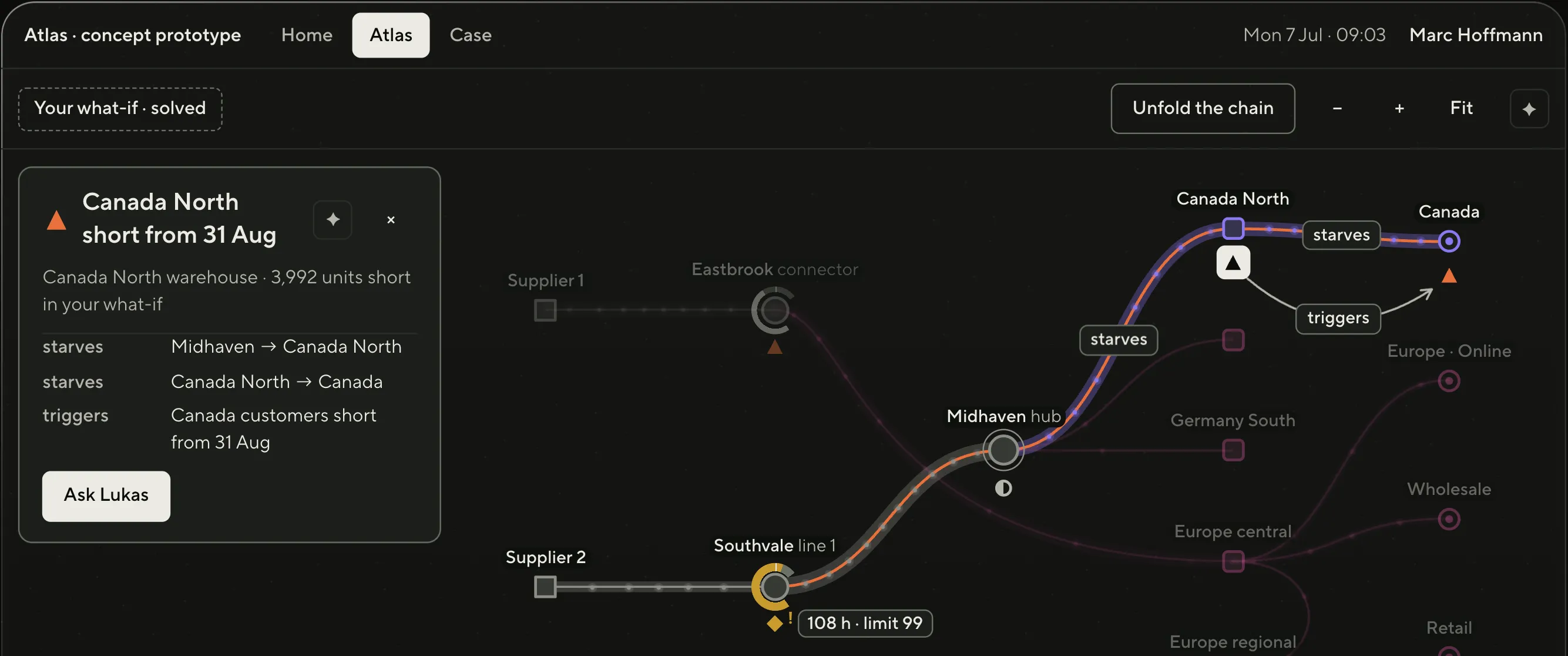
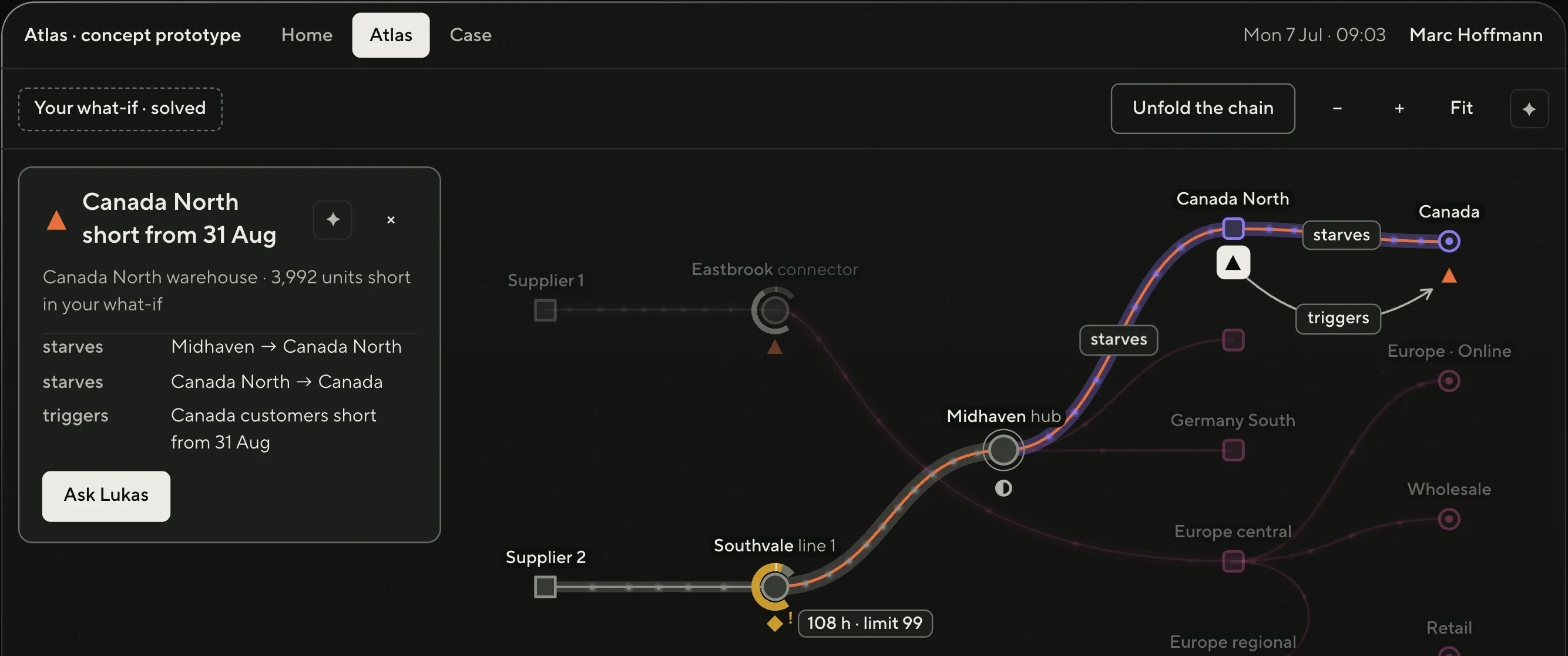
Next Gen Atlas
Lead UX Designer
Design leader who untangles complex enterprise work into calm, AI-native products. 10+ years across supply chain, CRM, healthcare, telecom and fintech.
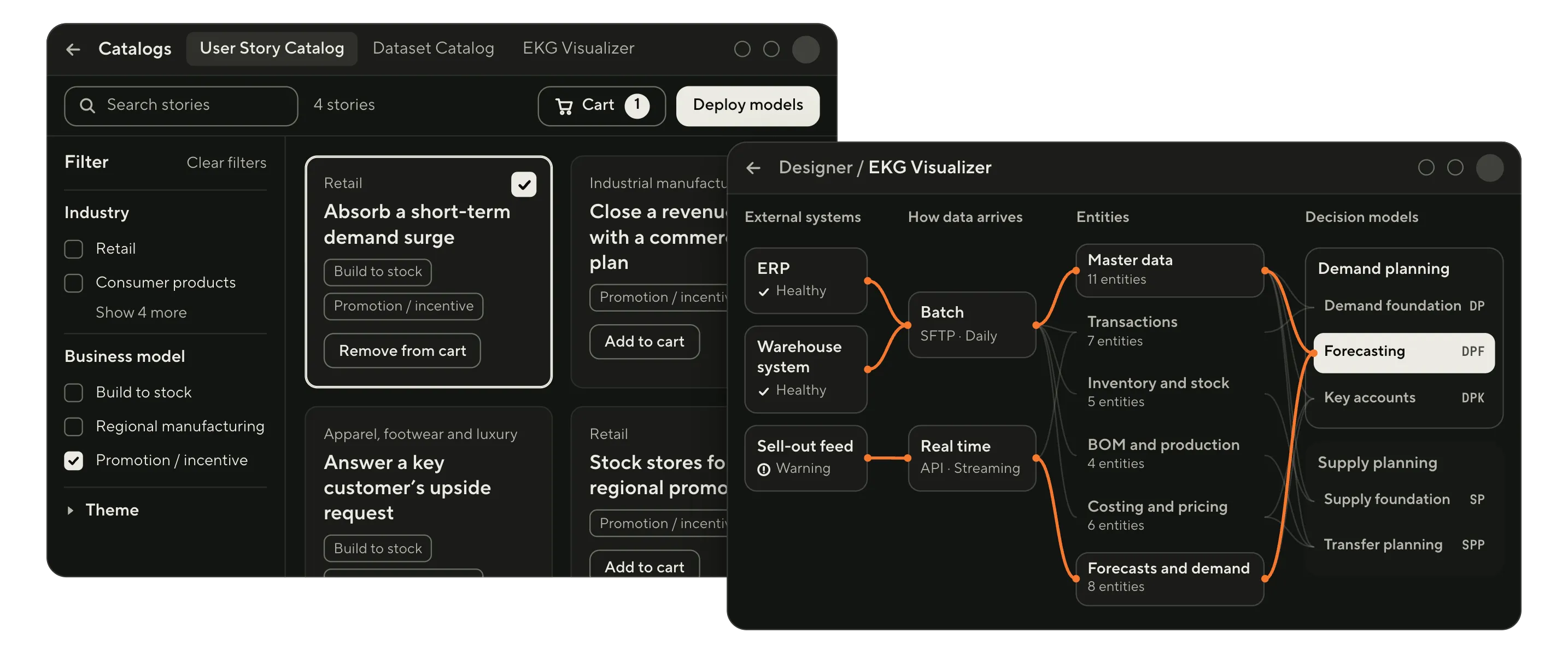
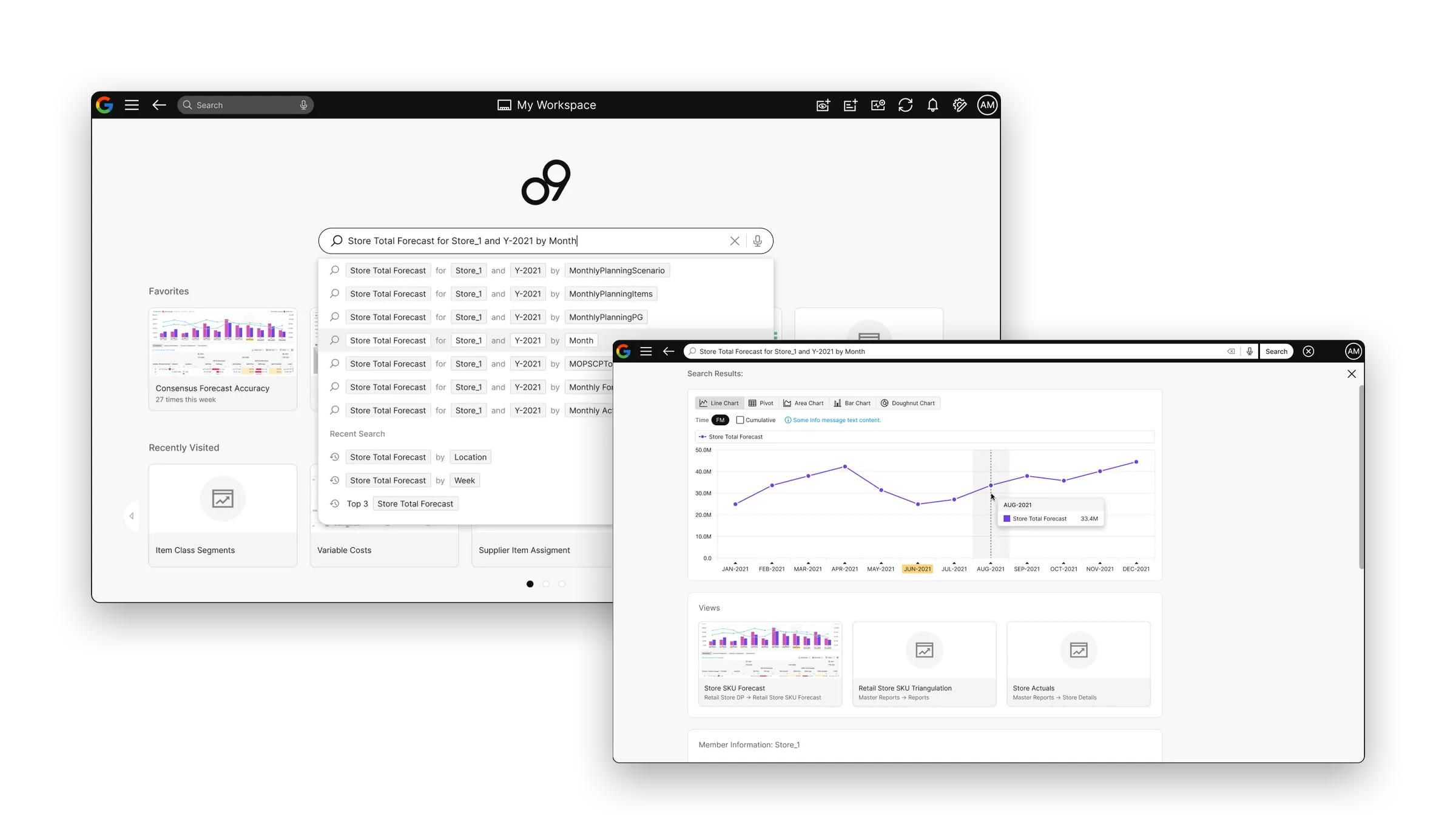
Now at o9 Solutions, shaping how planners and AI agents work on one living plan, on a platform used by Fortune-50 companies.
“Think more, design less.”
o9 Solutions · 2026
Lead UX Designer
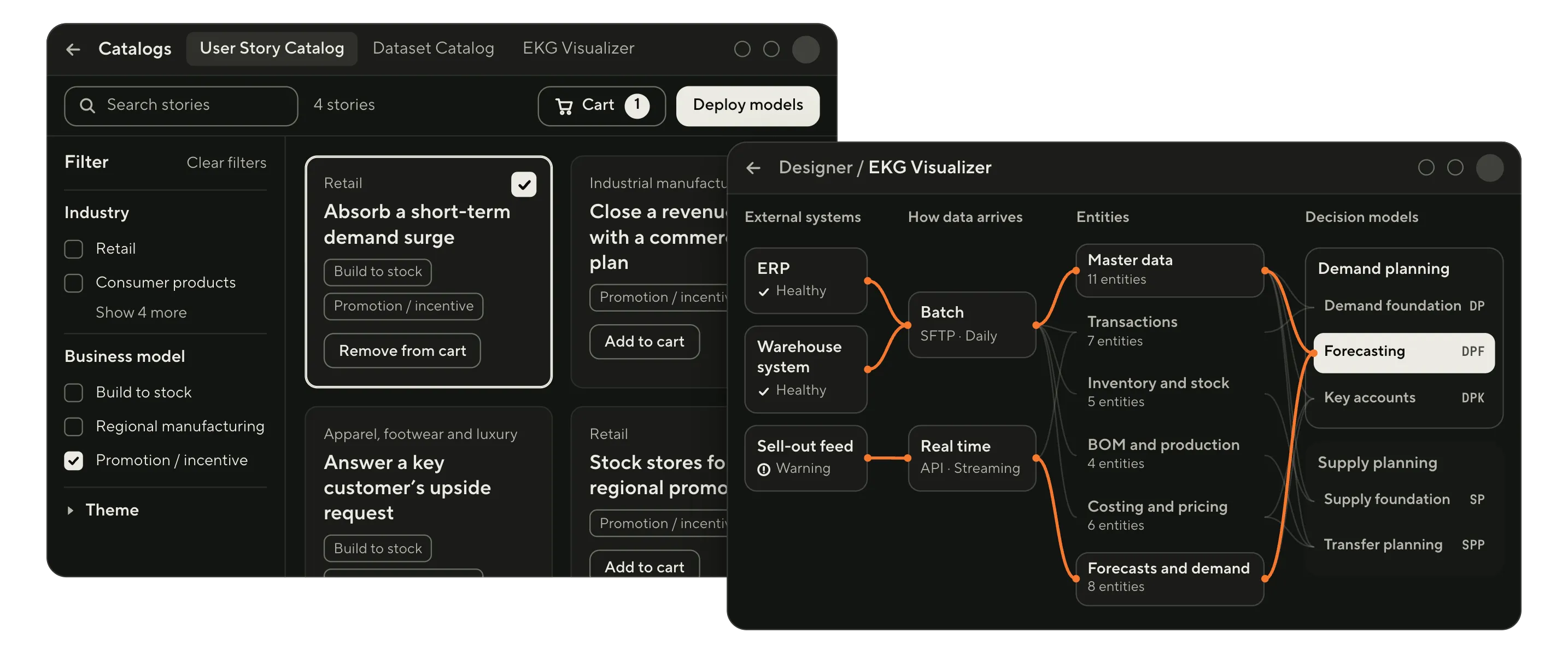
o9 Solutions · 2025–26
Lead UX Designer

Salesforce · 2024–25
Lead Product Designer

Salesforce · 2023
Senior UX Designer
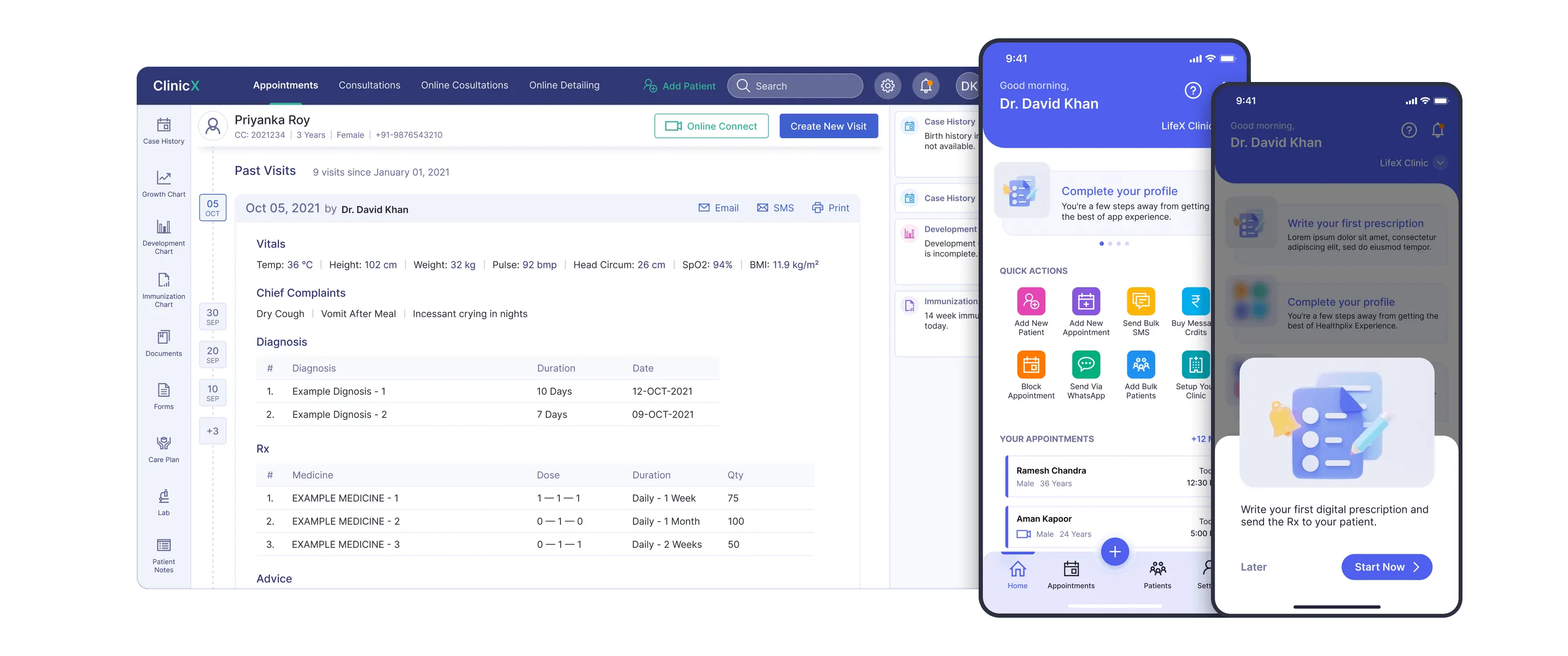
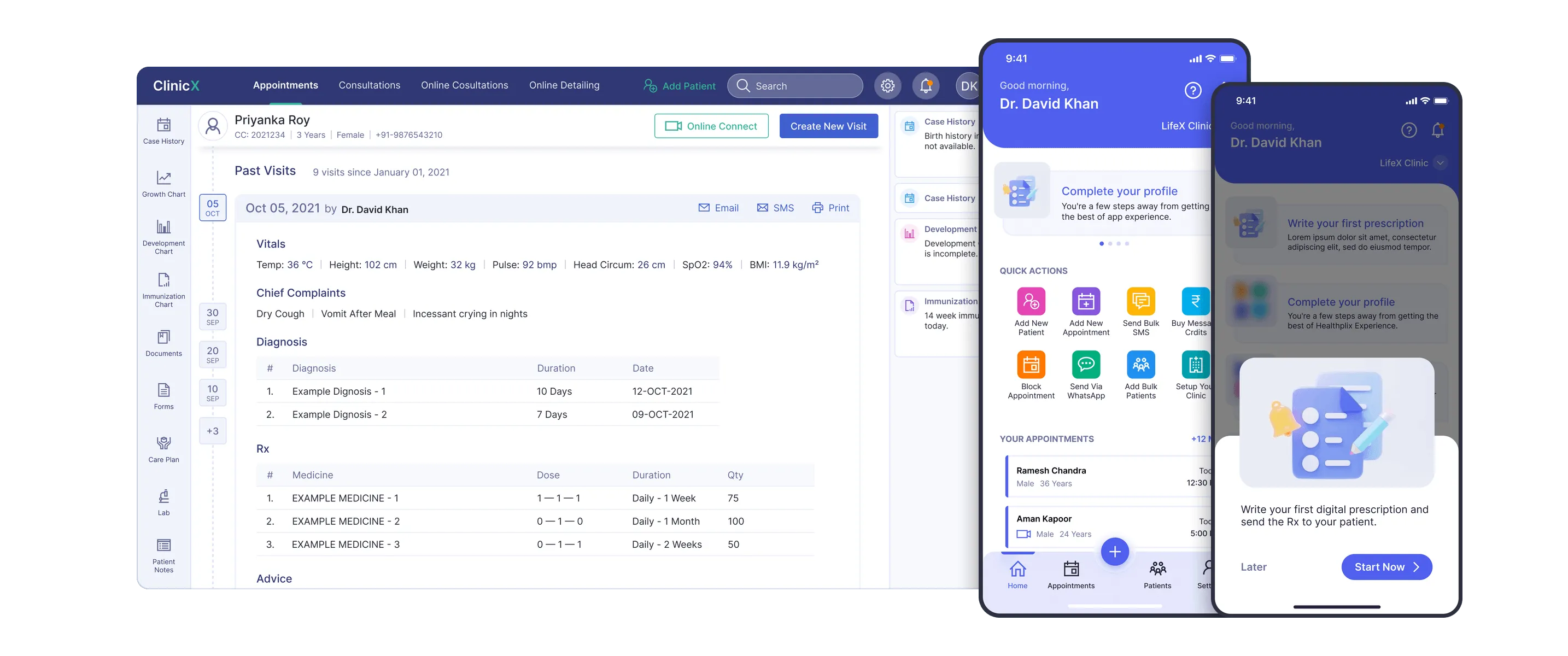
HealthPlix · 2021–22
Senior UX Strategist
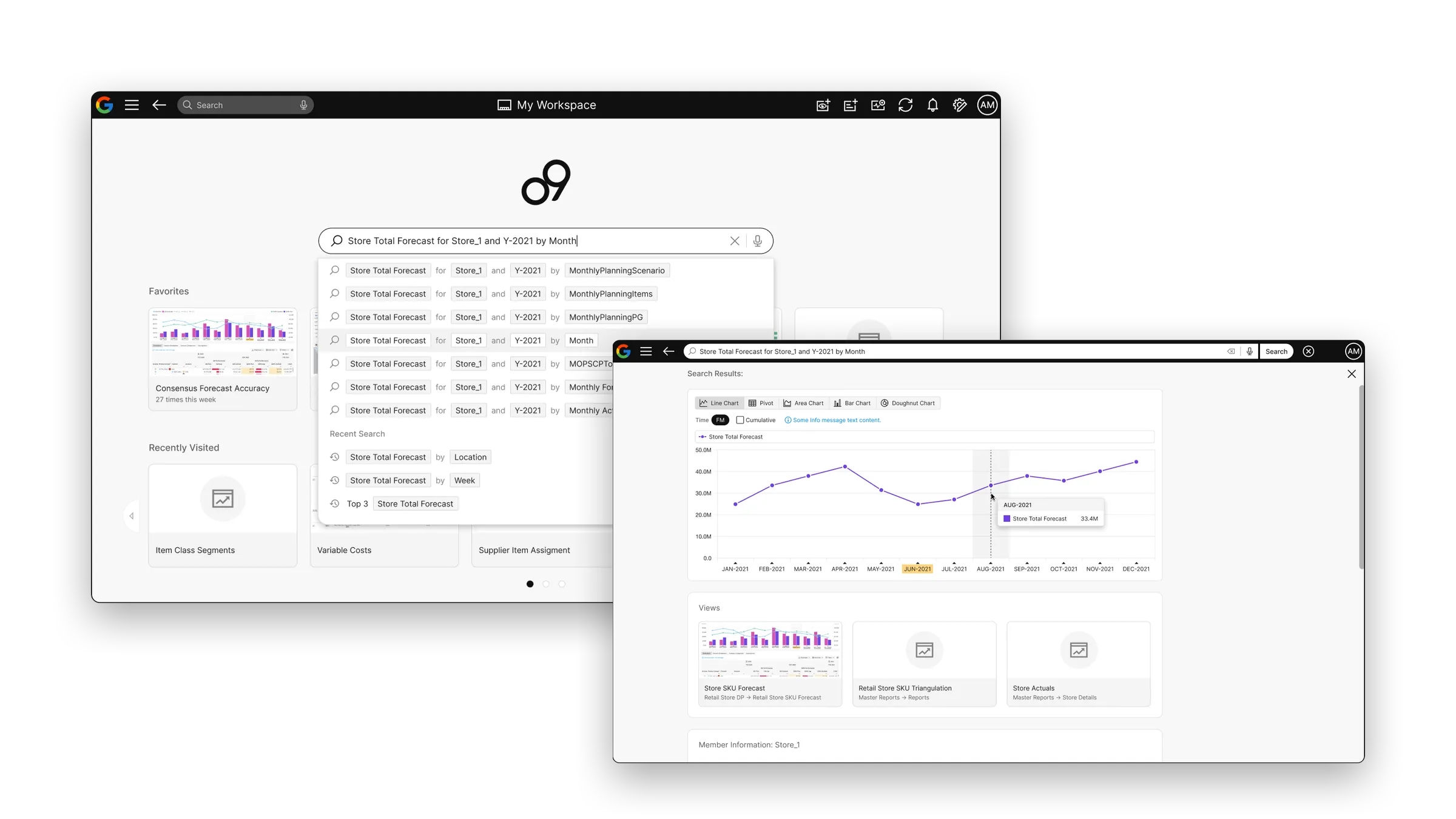
o9 Solutions · 2020–21
Senior UX Designer
A universal designer for the AI era. I research, frame, design and build, and take a tangled problem all the way to a product people trust.
Four moves on every project, and each leaves something real: a map, a bet, a system, a prototype.
Find the real problem first. I map the people, the data and the decisions before I draw a screen.
Make the bet explicit: who it serves, what must be true, and how we will know it worked.
Design the system, not the screen: one grammar of patterns, states and motion that scales.
Build to learn. Working prototypes, made with AI agents from my briefs, in front of real people early.
Early concepts and personal craft, kept on purpose.
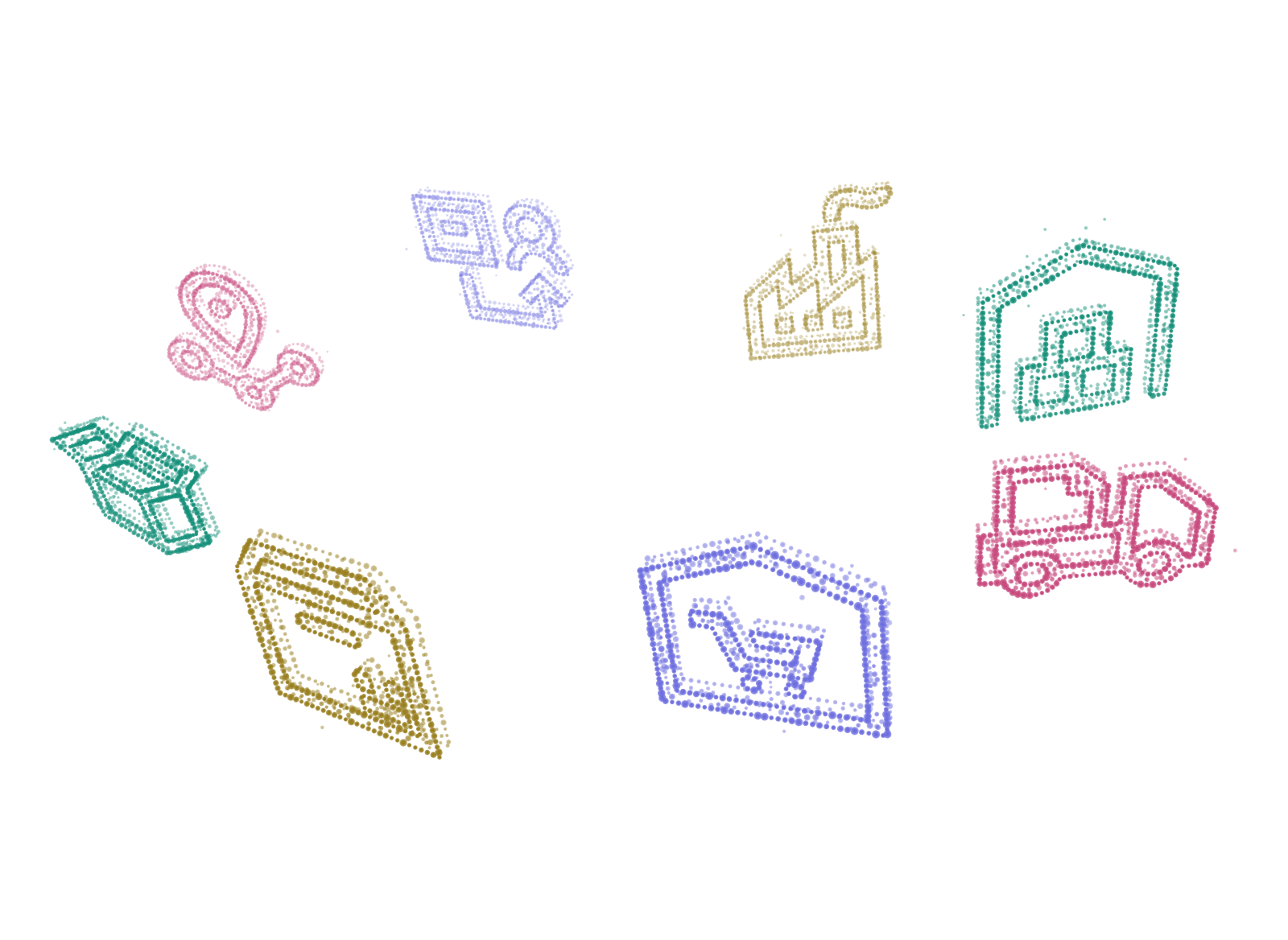
2020
Open-source icon library: 920+ line icons as a web font.
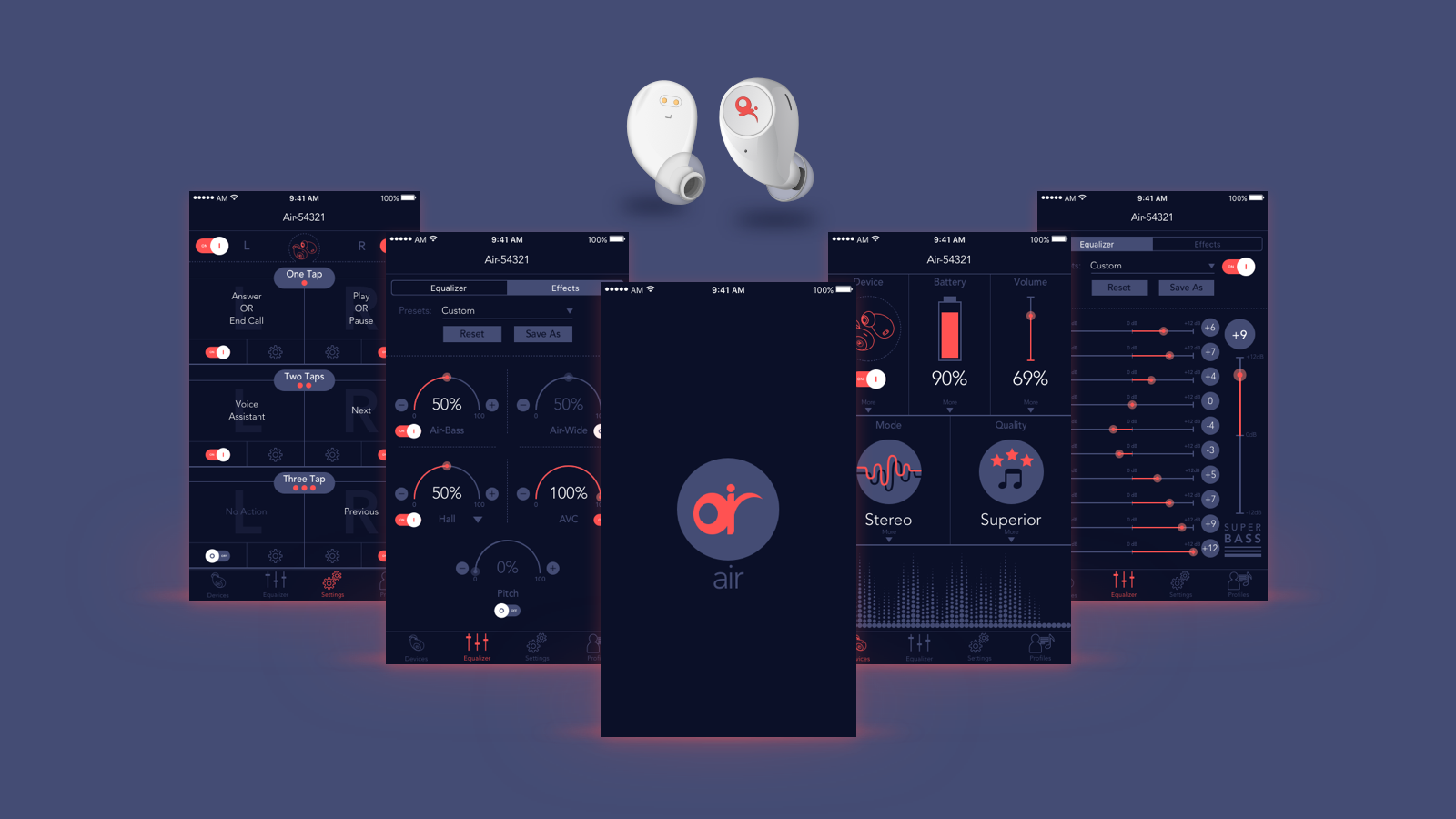
2018
Conceptual product and companion iOS/Android app.
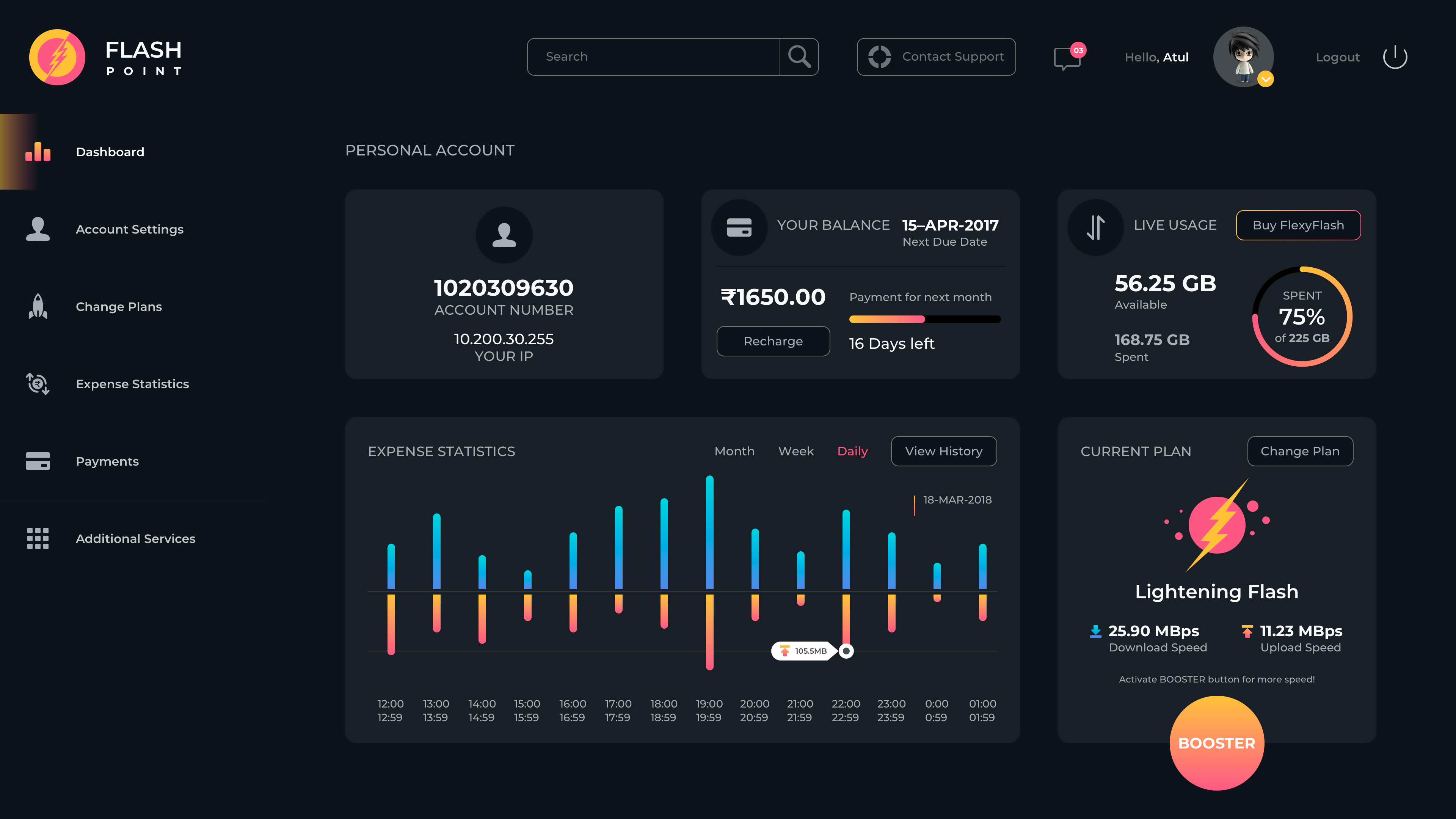
2017
Conceptual broadband dashboard.
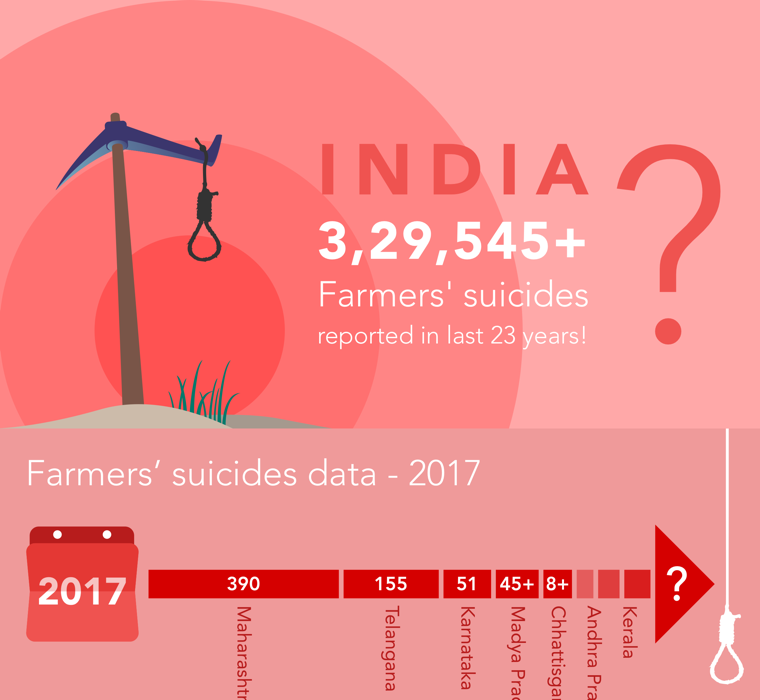
2017
Infographic report.
m.atulmeshram
TRY ONE OF THESE
KEYWORD SEARCH OVER THIS SITE · ↑ ↓ MOVE · ENTER OPENS · ESC CLOSES
RETRIEVED, NOT GENERATED · NO LANGUAGE MODEL RUNS ON THIS SITE