


GenX Canvas
Generative Experience Canvas
- ROLE
- Lead Product Designer Design strategy & planning, UX research, journeys & flows, visual design, prototyping, usability testing.
- TIMELINE
- Apr 2024 – Jun 2025 1 YR 2 MO
- TEAM
- 7 · Platform UX + GenAI team
- PLATFORM
- Salesforce Lightning · Einstein 1
- ORG
- Salesforce
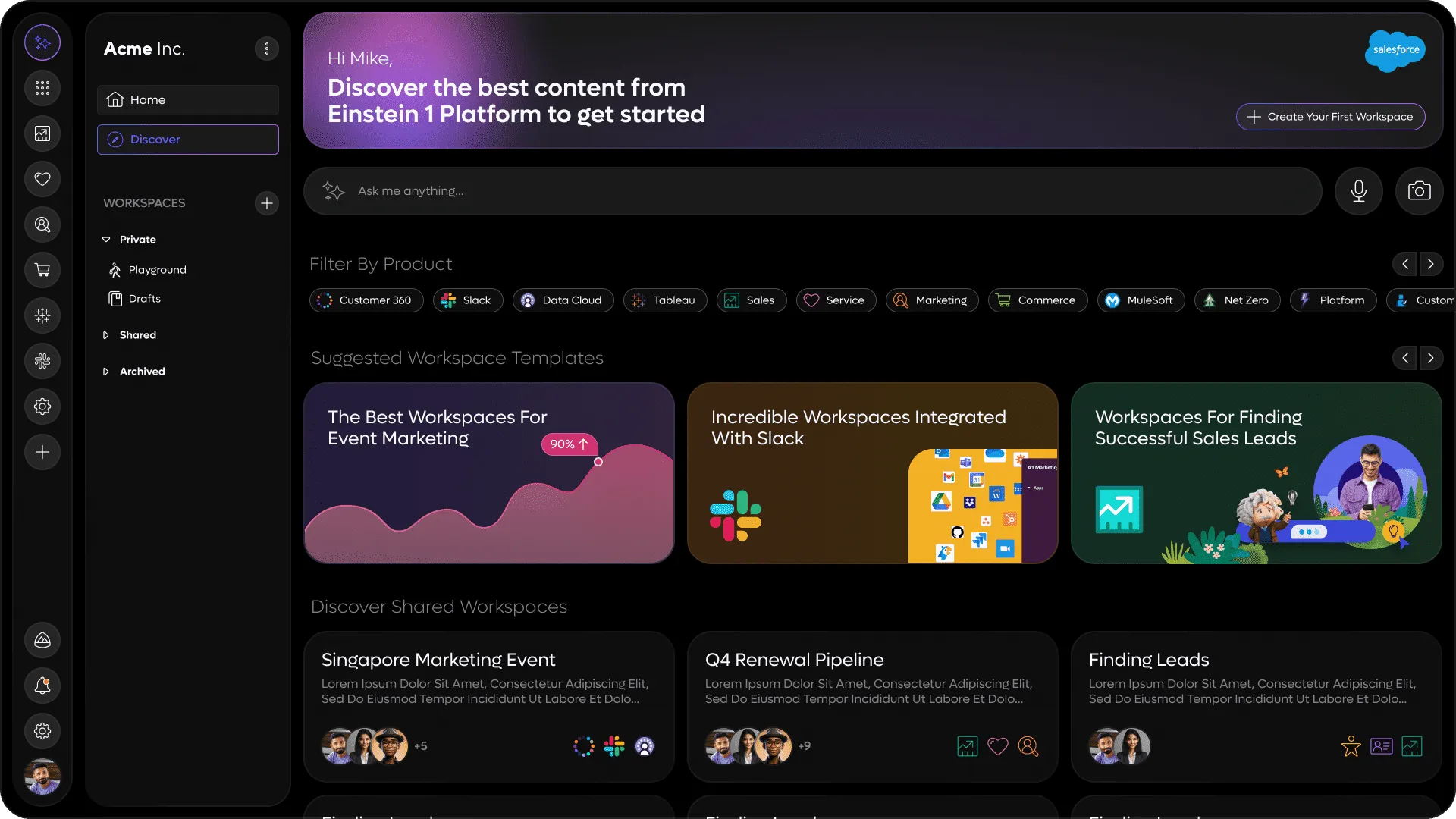

Context
An AI-powered, hyper-customized, adaptive interface that dynamically evolves by learning from user behaviors and actions.
At a glance
- Problem
- Every role needed a different view of the CRM, and admins didn’t have time to build one for each person. So people pieced each account together from three or more tools, and 92% said they went into customer meetings not fully prepared.
- The bet
- Let AI build the view each task needs from a request, live CRM data and the platform’s own components, with no admin setup.
- How it works
- The model follows a layout grammar and builds only from platform components. The canvas opens wherever the work starts, and people can move, edit or remove anything it makes.
- Outcome
- It went on to Generative Canvas for Lightning on AppExchange, and into two later Salesforce products.
My part
- Set the experience vision, taking the idea from a motion experiment (GeniMotion) to GenX Canvas.
- Planned and ran the research, including three surveys with 132 sales and service people.
- Wrote the ten principles and the layout patterns (A · B · C, F and Z) that we scored generated layouts against while tuning the prompts.
- Designed and prototyped the canvas end to end, with its nine entry points, three placements and editing model.
- Worked with the GenAI team on generation, and with Platform UX on the components the canvas builds from.
GenX Canvas was designed to make working with AI easier across a wide set of use cases. It worked beside Salesforce’s Einstein Copilot, and was meant to grow with the changing needs of service agents, business leaders, sales and service representatives, and admins.
How it started
- Jul 2023 GeniMotion Where the idea began.
- Apr 2024 GenX Canvas The project starts.
- Jul 2024 – Aug 2024 3 surveys 132 participants · US + India users.
- Jun 2025 14 months My time on the project ends.
I began developing a generative animation framework named ‘GeniMotion’ in July 2023, inspired by the idea that
“Motion brings emotions.”
GeniMotion was ideated to create dynamic elements like animated backgrounds, background mask filters, page transitions, loading animations, animated cursors, smooth parallax effects, and scrolling for any type of web app.
To make GeniMotion a reality, a Small Language Model (SLM) for animations and interactions was essential. However, its primary focus was limited to enhancing the visual appeal of web pages, animating components, and providing dynamic interactions.
The idea evolved when I realized that if real-time data, user behavior and user context could be integrated with AI-generated UI components, it would greatly improve the user experience.
This concept led to the development of ‘GenX Canvas’.
Problem
“Generative AI can do a lot, but can it truly generate a great user experience? Can it do so reliably while addressing the core pain points of our customers?”
Three problems behind the pain points
- No view that fits the role The platform could do almost anything, but roles rarely got a view that fit their work.
- Work spread across tools Some people left the CRM for tools that felt better.
- No time to learn or set up Trainings were long and dashboards were hard to customise.
Salesforce users’ pain points
- Overwhelming functionalities Salesforce’s extensive features can be daunting, and customization by admins often falls short due to varying end-user needs and limited admin bandwidth.
- Role-specific inefficiencies Different user roles (e.g. Salesperson, Account Executive, Operations Specialist, Sales | Service Executives) have distinct needs, and while user permissions help, they do not ensure efficiency for each role.
- User frustrations Some users find Salesforce so difficult that they prefer using other tools, even if less efficient.
- Dashboard limitations Users reported difficulties in customizing dashboards to their likings or face limitations with real time data visualization and analytics.
- Tool fragmentation Reliance on multiple tools aside from Salesforce due to better user experience elsewhere.
- Long Trailhead trainings Users need additional training and support to fully utilize Lightning capabilities.
Use cases in Lightning Experience
- Account Executive
Helping executive for customer meeting call and summarize it.
- Service Agent
Troubleshoot a case of a broken product.
In the demo below - Service Executive
Fix for an appliance breakage and sent out repair technician.
- Sales Manager
Generate a pipeline summary and breakdown.
- Sales Executive · Manager
Generate a deal-summary.
- Marketing Associate
Campaign health and performance.
Approach
What the research said
I ran three surveys with 132 sales and service people in July and August 2024.
- 92% Said they’re not fully prepared for meetings. Q02 · Preparedness
- 3+ Prepare with three or more tools, and use spreadsheets and documents more often than the CRM itself. Q04 · Tools
- 46% Users are missing notes from meetings. Q05 · Missing from CRM
- 84% Would give a new gen AI tool a try for preparing their next meeting. Q09 · Would they try it
How I worked
I adopted an experimentation-driven and iterative prototyping approach, refining the solution as we gathered insights and validated assumptions.
AI layout generation was the most uncertain part, so it went first. Component selection, data and integrations came after, on tested ground.
Research
Salesforce customers, especially in the SMB space struggle to create custom dashboards with contextual data.
- Quickly get up to speed on the account and situation.
- Connect data from multiple sources and systems.
- Have clarity and confidence about how to move the deal forward.
- Align | Collaborate | Gather information across account team.
- Get additional information in the moment as needed e.g. during ongoing customer meeting.
Users’ voice
-
“I am constantly swivel-chairing around trying to find the data I need to answer the customer’s question.”
Sales Account Director -
“A lot of the time we’ll look at external signals as well as internal signals in strategizing about a customer deal.”
Service Account Director -
“Most of the time our conversations and note taking happen outside of Salesforce.”
Sales Account Director
Survey
The three surveys put numbers on what users said in their own words.
3surveys
132participants
July–August 2024in the field
46% male 54% female
- US + India users
- 30+ states
- English speaking
- Sales and service roles
- 50–5000+ employees
- 25–74 years old
- IC or manager only
Question 01: What is your role and title at your company?
| Answer | Number of mentions |
|---|---|
| Sales representative | 30 |
| General sales role | 25 |
| Account manager | 15 |
| Sales manager | 10 |
| Assistant manager | 5 |
| Consultant | 5 |
| Customer engagement manager | 2 |
90%
Identified as direct customer sales roles.
Question 02: When preparing for sales meetings or calls with customers, how prepared do you typically feel?
| Answer | Weighted percentage of responses |
|---|---|
| Not at all prepared | 0% |
| Somewhat prepared | 5% |
| Moderately prepared | 29% |
| Mostly prepared | 56% |
| Fully prepared | 8% |
92%
Said they’re not fully prepared for meetings.
The answers that make it up
Question 03: How much total time do you spend preparing (on-average) in advance of a customer meeting or call?
| Answer | Weighted percentage of responses |
|---|---|
| 1 to 2 hours | 32% |
| 2 to 4 hours | 26% |
| 4 to 8 hours | 13% |
| An entire day | 15% |
| Several days | 15% |
72%
Spent multiple hours preparing for meetings.
Question 04: When preparing for upcoming sales/service meetings or calls with customers, what tools do you use?
| Answer | Weighted percentage of responses |
|---|---|
| Spreadsheet application | 60% |
| Word processing application | 55% |
| Recent news about the customer | 46% |
| Presentation application | 41% |
| CRM application | 40% |
| Call prep tools | 24% |
| Customer call transcripts | 21% |
| LinkedIn updates | 25% |
| Database application | 10% |
| Others | 5% |
3+
Use 3 or more tedious antiquated tools to prepare.
Question 05: When preparing for upcoming sales calls what is missing from your CRM data you need?
| Answer | Weighted percentage of responses |
|---|---|
| Notes from previous meetings | 46% |
| Financials about the customer | 36% |
| Files in other communication tools | 38% |
| Files in Slack | 23% |
| Customer call transcripts | 25% |
| Others | 4% |
46%
Users are missing notes from meetings.
The answers that make it up
Question 06: When on sales calls with customers and they ask a question, how easy or difficult is it to find the right information you need in the moment?
| Answer | Weighted percentage of responses |
|---|---|
| 1 · Very difficult | 2% |
| 2 · Difficult | 13% |
| 3 · Moderate | 27% |
| 4 · Easy | 47% |
| 5 · Very easy | 11% |
88%
Users don’t find it very easy to get the information they need during a call.
The answers that make it up
Question 07: What are some surprising questions you have been asked in the last 60 days that you wish you had information at your fingertips?
| Answer | Number of mentions |
|---|---|
| Lack of pricing and cost information | 20 |
| Lack of information about discounts and promotions | 15 |
| Lack of information about product availability and details | 12 |
| Lack of information about order status and delivery | 10 |
| Lack of customer information and history | 10 |
| Lack of information about process and timelines | 8 |
| Having documentation and information readily available | 7 |
| Lack of information about future projections and trends | 5 |
| Unrelated or unclear responses | 3 |
35
Mentioned pricing and discounts.
The answers that make it up
Question 08: Do you use Generative AI tools like ChatGPT, Gemini, you.com, Perplexity, or similar tools now to help you prepare for calls/meetings?
| Answer | Number of mentions |
|---|---|
| Not using AI tools | 1 |
| Using AI tools occasionally | 7 |
| Using AI tools regularly | 14 |
| Recognizing AI as helpful technology | 24 |
| Lack of confidence or familiarity with AI tools | 6 |
| Desire to use AI tools | 6 |
| Unrelated or irrelevant responses | 6 |
56%
Users recognize, or regularly use, gen AI products.
Question 09: If a new Generative AI tool could provide all the information you need and combine the features of the tools you mentioned earlier, how likely would you be to use it for preparing your next meeting?
| Answer | Weighted percentage of responses |
|---|---|
| 1 · Not at all | 8% |
| 2 · Not sure | 13% |
| 3 · May be once | 27% |
| 4 · Will give a try | 44% |
| 5 · Very likely | 41% |
84%
Users want to give a try to find right information and want to use features when preparing for a meeting.
The answers that make it up
From finding to design
| What the research found | What the design does | Where |
|---|---|---|
| 92%Said they’re not fully prepared for meetings. | One prompt or one suggested topic builds the account picture before a meeting. | GenX Home |
| 3+Use 3 or more tedious antiquated tools to prepare. | One canvas pulls data from many systems through the platform’s data layer, so there is no extra tool to check. | Einstein 1 platform |
| 46%Users are missing notes from meetings. | Case comments and service history sit on the canvas beside the record they belong to. | GenX Home |
| 88%Users don’t find it very easy to get the information they need during a call. | Entry points where the work happens (Slack, notifications, Copilot), and ephemeral widgets that answer a question mid-call. | Entry points |
| 35Mentioned pricing and discounts. | Purchase-order and product-detail widgets are part of the generated case canvas, so prices and product details are on screen when the question comes. | GenX Home |
| 56%Users recognize, or regularly use, gen AI products. | GenX Home offers a prompt for people who already use AI tools, and suggested topics for everyone else. | GenX Home |
| Customization by admins often falls short due to varying end-user needs and limited admin bandwidth. | The layout grammar generates a layout per role and task, with no admin setup. | Layout architecture |
| 84%Users want to give a try to find right information and want to use features when preparing for a meeting. | The canvas opens as a tab or a page section inside the pages people already work in, so there is no new app to learn. | Layout architecture |
Landscape
Some AI-powered apps enhancing the user experience, productivity and collaboration.
14 products in the scan
- Microsoft 365 Copilot
- Microsoft Fabric
- Gemini
- ChatGPT
- fireflies.ai
- Fathom
- Otter.ai
- watsonx
- Avoma
- tl;dv
- MeetGeek
- Fellow
- Descript
- Sembly AI
Food for thought · 12 references
- Welcome to the Gemini era Google
- Google AI Search Google
- Search in the Gemini era Google
- Watch this before using gen AI Google
- New ways to Search: Notes & Follow Google
- Generative AI Microsoft
- Write better prompts with Copilot Microsoft
- 365 Copilot AI Microsoft
- Copilot Studio Microsoft
- Real-Time Intelligence in Microsoft Fabric Microsoft
- Generative AI — UI Vercel
- AutoDesigner 2.0 Uizard
Most of these assistants answer inside a chat thread, and the meeting tools capture conversations outside the CRM. None that I found built a working view from the CRM’s own records, in context. GenX Canvas was designed to do that.
Strategy
I adopted an experimentation-driven and iterative prototyping approach, starting with the most uncertain elements of the project and refining the solution as we gathered insights and validated assumptions.
-
AI layout generation
- Build playground for testing and iteration
- Rapidly iterate on wide range of use cases using lo-fi references
- Score outputs on known principles and IA to optimize prompts
-
Component selection
- Integrate with the platform’s component type system
- Test and experiment with AI chosen components
- Determine if additional complex types are needed
-
Optimization + integration
- Test if AI can determine best and most important data to pull
- Define and test caching strategy
- Identify and test integrations to determine dependencies
Principles
Ten principles for generated UI. Six of them are about ephemeral content, the widgets made for a moment and then let go.
-
Content categorization
A linguistic-based prompt summary, including search and indexing. Content building and duplication detection. Content should be arranged in logical importance order.
-
Contextual awareness
System should consider the context in which users interact with ephemeral content and tailor the UI accordingly. For example, ensuring that notifications about expiring content are timely and relevant.
-
Immediacy
Generated UI must convey information quickly and efficiently, as users have a limited window to interact with the content. This calls for clear, concise messaging and straightforward user flows.
-
Visual cues for urgency
Since content is temporary, generated UI should use visual cues like timers or progress bars to indicate the limited lifespan of content.
-
Simplicity
Generated UI tend to be minimalist and straightforward, focusing on the core functionality or message without unnecessary clutter. The goal is to reduce cognitive load.
-
Anticipation
Since users know that the content is temporary, creating a sense of anticipation for the next ephemeral experience can keep them engaged and coming back for more. This can be achieved through teasers, countdowns, or previews of upcoming content.
-
User control
Despite the ephemeral nature, users should feel in control of their content and interactions. Providing options for deletion, editing, or adjusting privacy settings is crucial.
-
Intuitive gestures and interactions
Generated UI should offer users intuitive gestures for navigation and interaction, allowing users to quickly understand how to engage with the content.
-
Personalization and customization
Providing options for users to personalize their ephemeral experiences, such as filters or stickers, enhances engagement and fosters a sense of ownership over the content.
-
Intention & language translation
Automatically translation of text, speech or intention from one language to another. Widget translation from kind to another. Transforming voice command into text content and vice versa, facilitating analysis and comprehension.
Key decisions
-
A new canvas for each task
Generate a canvas for each task from the request and live CRM data.
- Trade-off
- A generated canvas is less predictable than a fixed dashboard. The layout grammar and the person’s control had to make up for that.
-
Layouts follow known patterns
Generated layouts follow the A · B · C information architecture, read as F for action-led tasks or Z for summaries.
- Trade-off
- Less novelty. A task that fits no pattern needs a new pattern added to the grammar.
-
Ask first, then hand over control
Copilot finds the record and offers Prepare Canvas before it builds anything.
- Trade-off
- Every canvas takes one extra step, and regenerating has to keep what a person already changed.
-
Ephemeral by default
A canvas made on request is labelled ephemeral. Lasting work lives in Canvas Studio’s private, shared and template workspaces.
- Trade-off
- Keeping a canvas, and finding it again, had to be obvious.
Six decisions
-
A new canvas for each task
Generate a canvas for each task from the request and live CRM data.
- Why
- Dashboards needed an admin and stayed static.
- Trade-off
- A generated canvas is less predictable than a fixed dashboard. The layout grammar and the person’s control had to make up for that.
-
One canvas, many entry points
Nine entry points and three placements (full screen, tab, page section) open the same canvas, and each one is meant to bring its context with it.
- Why
- Work also started in Slack, a notification or Copilot.
- Trade-off
- Each entry point needed agreement with the team that owned it, and each placement needed its own layout rules.
-
Layouts follow known patterns
Generated layouts follow the A · B · C information architecture, read as F for action-led tasks or Z for summaries.
- Why
- Known patterns are easier for people to read, and easier to check a generated layout against.
- Trade-off
- Less novelty. A task that fits no pattern needs a new pattern added to the grammar.
-
Build only from platform components
The model chooses and arranges the platform’s own component types. It does not write UI code.
- Why
- Every canvas inherits accessibility, security, data binding and the design system, so it can be tested like any other screen.
- Trade-off
- The canvas can only show what the components allow, so a new need means a new component type.
-
Ask first, then hand over control
Copilot finds the record and offers Prepare Canvas before it builds anything.
- Why
- A confirmed start and easy fixes make a generated layout worth keeping.
- Trade-off
- Every canvas takes one extra step, and regenerating has to keep what a person already changed.
-
Ephemeral by default
A canvas made on request is labelled ephemeral. Lasting work lives in Canvas Studio’s private, shared and template workspaces.
- Why
- A canvas for every task would otherwise bury people in canvases nobody cleans up.
- Trade-off
- Keeping a canvas, and finding it again, had to be obvious.
Entry points
Users can access the Generative Canvas UI through multiple entry points.
GenX UI Canvas
Opened from GenX UI Home
Einstein 1 platform experience
The canvas has its own layer in the platform, beside Copilot. Below it are the component types, building blocks and renderers it builds with, and below those the AI Cloud platform, Data Cloud and Einstein.
- LEX
- Mobile
- Setup
- App Builder
- Content Builder
- Experience Builder
- Flow Builder
- Sites
- and more
Generative Canvas (GenX UI)
works withCopilot
- Component types
- Building blocks and patterns
- Renderers
AI Cloud Platform
Data Cloud
Real-time data
Clouds
- Sales
- Service
- Marketing
- Commerce
- Einstein
- Platform
- Analytics
- Customer Success
- Net Zero
- Work.com
Industries
- Automotive
- Communications
- Consumer Goods
- Education
- Energy & Utilities
- Financial Services
- Healthcare & Life Sciences
- Manufacturing
- Media
- Nonprofit
- Professional Services
- Public Sector
- Retail
- Technology
- Travel, Transportation & Hospitality
Einstein Trust Layer
Einstein
Connectors
- Slack
- Tableau
- Canvas (Quip)
- Heroku
- MuleSoft
- Partner apps
Layout architecture
The GenUI Canvas is flexible and can be embedded at various locations within the application, depending on the use case or workflow requirements.
- 1. Full screen — Gen UI page | canvas
- 2. Tab — Gen UI container | canvas
- 3. Page section — Gen UI container | canvas
- Basic layout — Nine widgets on an even grid.
- Component resized layout — Each widget resized to its content.
- Generated layout — The order the canvas generates.
- Layout information architecture — Read top to bottom: A, then B, then C.
- F-shaped layout (action based) — Each row left to right, and the left column top to bottom.
- Z-shaped layout (summary / info based) — Left to right, then back across to the next row.
Constraints
- Inside the trust boundary A canvas could show only what the person was already allowed to see, and generation had to stay behind the Einstein Trust Layer.
- Generation takes seconds Generating a layout and fetching its data took seconds, so the canvas had to be useful while it was still loading.
- No admin in the loop A canvas had to work without anyone setting it up first.
- Beside the tools people already use Copilot, Lightning pages and Slack already had their users and habits.
The AI contract
This is what the canvas promises at each step of a generation, timed to the demo below.
| Moment | What the person sees | Why |
|---|---|---|
| 0:12Find the record first | Copilot acknowledges the request (“Understanding your request…”), then names the case and shows its contact and account as a card. | The canvas is about something the person recognises before anything is generated. |
| 0:15Ask before building | Nothing is generated until the person presses Prepare Canvas. | One extra step takes a second and avoids building the wrong canvas. |
| 0:20Show the work | “Generating the layout…”, with the canvas’s skeleton already in place. | Seconds feel shorter when the shape is already there, and nothing jumps when the data lands. |
| 0:23Label it ephemeral | “New Ephemeral Canvas created on your request.” | Saying up front that a canvas is temporary means nobody is surprised when it is gone. |
| 0:25Rank what it suggests | Suggested knowledge articles carry a relevance score. | A score helps people decide which article to open first. |
| HomeSay it can be wrong | Under the prompt bar: “Please review for accuracy, safety before relying on the content.” | A generated canvas is a draft until a person has checked it. |
| 0:30–0:58Hand over control | A widget is resized and moved. Its menu offers pin, collapse, move, edit and delete, and the canvas menu offers refine, rename, collapse all and delete. | Fixing one widget is quicker than generating the whole canvas again. |
| When it failsSay what it cannot do | An unclear request should get suggested topics to choose from, and a widget with no data, or no access, should say which. | An empty widget that looks broken reads as the AI failing. |
Outcome
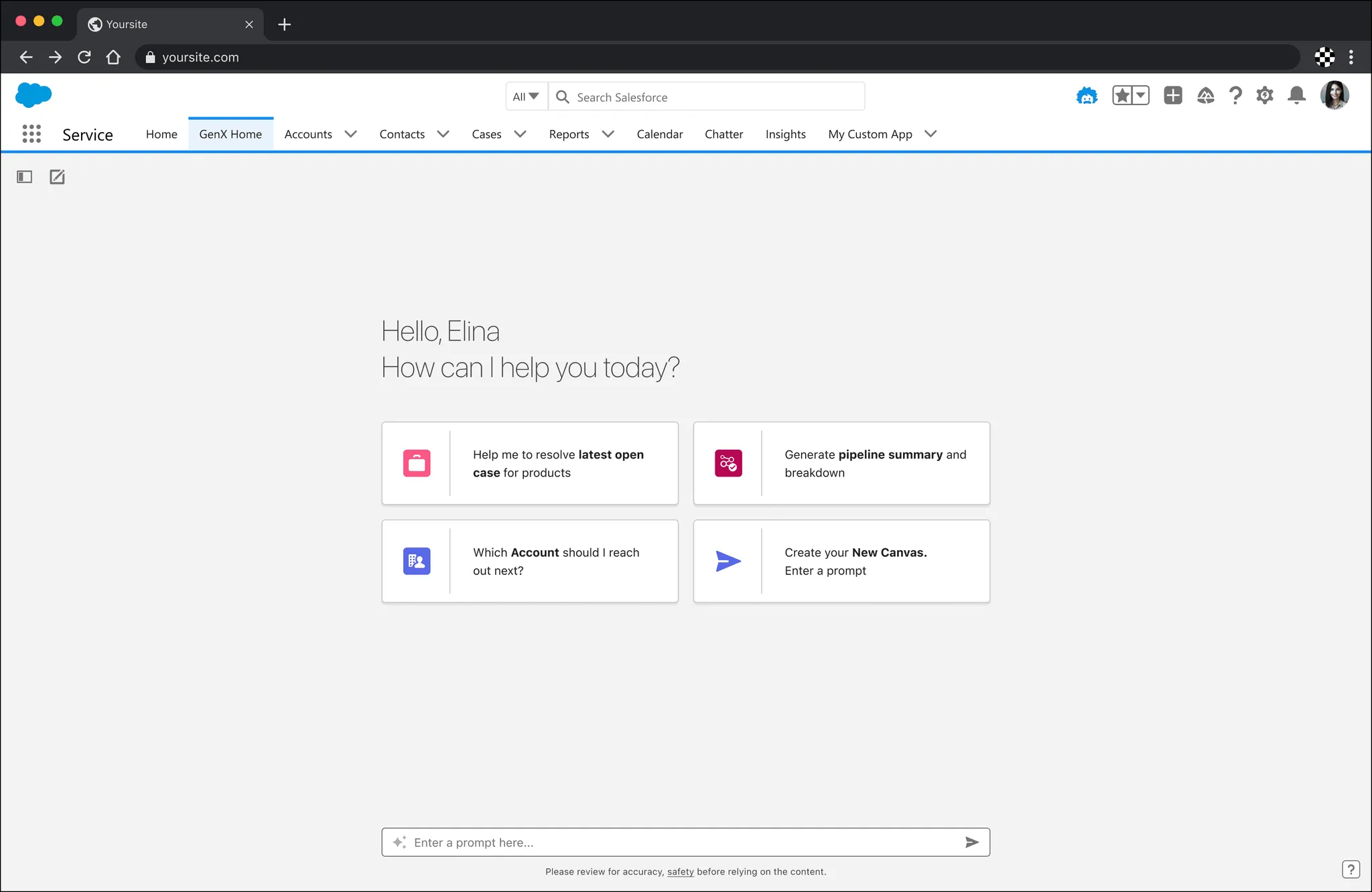
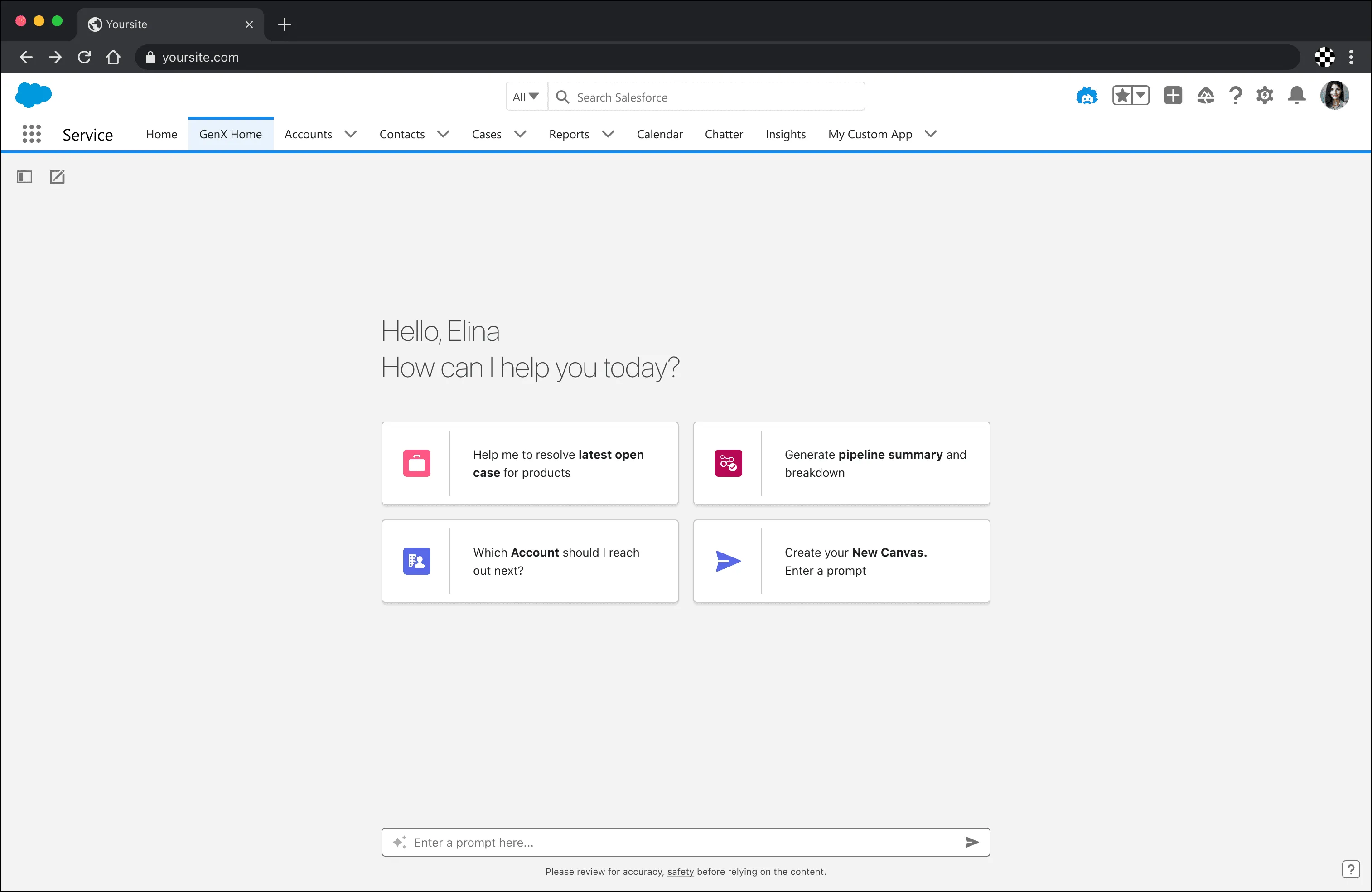
GenX Home
Users can access the GenX Canvas UI via the GenX Home tab. From there, they can either enter a prompt in the Co-Pilot panel or begin creating a canvas by selecting from AI-suggested topics.
GenX Home — immersive
GenX Canvas Studio
Where it went
- Salesforce AppExchange — Generative Canvas for Lightning Salesforce
- Two later Salesforce products Salesforce
How success would be measured
| Signal | Baseline | Aim |
|---|---|---|
| Feeling fully prepared for a customer meeting | 8% fully prepared | Up |
| Time spent preparing for a meeting | 72% spend multiple hours | Down |
| Tools used to prepare | 3 or more | Down |
| Finding an answer during a call | 11% find it very easy | Up |
| Canvases kept, and edits made to them | None yet (a new measure) | More canvases kept. Edits count as engagement, regenerations as misses. |
| Trying it, then using it again | 84% want to give a try | Intent turns into repeat use |
Learnings
What I’d carry into the next AI product, and what I’d do differently.
-
Generated layouts need rules
The principles, the A · B · C information architecture and the F and Z reading patterns made the canvas predictable enough to trust.
From Layout architecture -
Let people change what the AI made
A generated layout only became a workspace once people could change it.
From GenX Home -
Agree the measures before the build
The survey already gives a baseline for time spent preparing, the number of tools and how easy it is to find an answer during a call. I would agree the other measures with the team.
From How success would be measured
-
Start with what is least certain
AI layout generation was the riskiest part, so it went first.
From Strategy -
Generated layouts need rules
The principles, the A · B · C information architecture and the F and Z reading patterns made the canvas predictable enough to trust.
From Layout architecture -
Put numbers on the problem
Figures like “92% not fully prepared” and “3 or more tools” were easier to design against, and to defend, than a single quote.
From Survey -
Bring the context in
People open the canvas from Copilot, a notification, Slack or an email link. Carrying that context into the canvas mattered as much as what the canvas could show.
From Entry points -
Let people change what the AI made
A generated layout only became a workspace once people could change it.
From GenX Home -
Motion shows what changed
When a canvas rearranges itself, motion lets people follow what moved and where it went.
From How it started -
Agree the measures before the build
The survey already gives a baseline for time spent preparing, the number of tools and how easy it is to find an answer during a call. I would agree the other measures with the team.
From How success would be measured